Description:
What's in the box
Details:
| Brand | Omezizy |
|---|---|
| Connectivity Technology | Bluetooth |
| Printing Technology | Thermal |
| Special Feature | Network-Ready |
| Model Name | D520BT |
| Printer Output | Monochrome |
| Controller Type | Android, iOS |
| Maximum Media Size | 4.6 inches |
| Included Components | Thermal Labels, Roll Paper, Fanfold Paper |
| Print media | Labels |
Visit the Omezizy Store
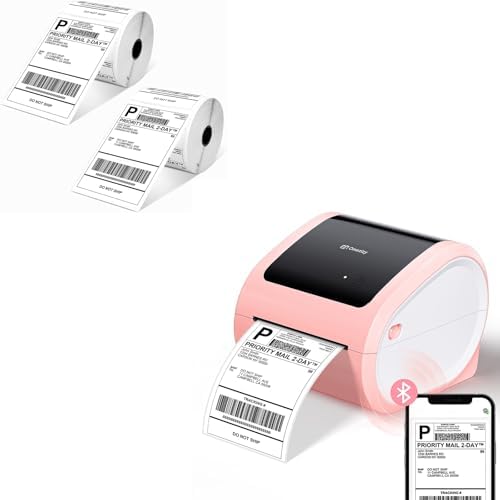
D520BT Bluetooth Shipping Label Printer and 2 Roll Thermal Labels, Wireless Label Printer for Small Business
BHD10219
Quantity:
Order today to get by 7-14 business days
This item qualifies for free delivery
 Imported From: United States
At BOLO, we work hard to ensure the products you receive are new, genuine, and sourced from reputable suppliers.
Every product in the BOLO catalogue is sourced through our Verified Global Supply Network of verified sellers, authorized distributors or directly from the manufacturer.
Each product undergoes thorough inspection and verification at our consolidation and fulfilment centers to ensure it meets our strict authenticity and quality standards before being shipped and delivered to you.
If you ever have concerns regarding the authenticity of a product purchased from us, please contact Bolo Support. We will review your inquiry promptly and, if necessary, provide documentation verifying authenticity or offer a suitable resolution.
Your trust is our top priority, and we are committed to maintaining transparency and integrity in every transaction.
While we strive to display accurate information, variations in packaging, labeling, instructions, or formulation may occasionally occur due to regional differences or supplier updates. For detailed or manufacturer-specific information, please contact the brand directly or reach out to BOLO Support for assistance.
Unless otherwise stated, all prices displayed on the product page include applicable taxes and import duties.
BOLO operates in accordance with the laws and regulations of Bahrain. Any items found to be restricted or prohibited for sale within the Bahrain will be cancelled prior to shipment. We take proactive measures to ensure that only products permitted for sale in Bahrain are listed on our website.
All items are shipped by air, and any products classified as “Dangerous Goods (DG)” under IATA regulations will be removed from the order and cancelled.
All orders are processed manually, and we make every effort to process them promptly once confirmed. Products cancelled due to the above reasons will be permanently removed from listings across the website.

Omezizy D520-BT Label Printer —— Strong Helper for Your Business
- Support both Bluetooth and USB connection, use our APP to print with Bluetooth to make run a business only with a smartphone or tablet possible. Now, Windows & Mac also support printing via Bluetooth.
- Print wirelessly saves more space.
- Compatible with Windows, Mac, Chrome OS and Linux, Android and iOS systems, and compatible with all major platforms like Esty, eBay, USPS, Shopify, etc
- Green money saver - doesn't need ink and works with labels you got from shippers, save your money.
- Included label edit software, you can batch edit your labels or customize your own labels.


Windows & Mac also Support Printing via Bluetooth - Steps:
1. Open the software homepage.
2. Click on "Please install the driver connect the printer", and select "Add printer". 3. Click the "wireless connection" button and wait for your computer to search the printer. If there shows the printer, click it and connect.
4. If the machine displays "connected", congratulations, the Bluetooth connection is successful, and you can use the printer's Bluetooth function with your computer. If the connection fails, please restart the printer and repeat the previous steps.
Friendly reminder:
1. Bluetooth now supports Mac/Win. The computer needs to have Bluetooth function to connect. Please also pay attention when using.
2. If a computer is connected to USB, it cannot be connected via Bluetooth on the same one computer. But, printers can support two different device connections, with one device connected via USB and the other different devices can connect via Bluetooth.


Easy to Use Bluetooth Label Printer
5mins was up and printing labels direct from mobile. No more complicated steps, get it and print!

No Need Label Holder
The shipping label printer supports roll paper loaded inside, saves money on label holders, no more mess with the labels anymore!

Clear Printing Quality
With 203DPI and Japanese print head, every detail of the labels printed by this Bluetooth label printer could be scanned and read efficiently and effectively

Questions Answered Quickly
Q : How to start printing with Chrome OS?
1. Connect the printer and computer with USB and turn on the printer.
2. Enter “Labelife” in the Chrome Web Store and add the extension to your Google Chrome.
3. Open the Labelife extension. Click "Add" to discover your printer. And "Setting Printer" to complete the print settings.
4. Open the file in Google Chrome and "Ctrl + P" to wake up the print interface, select the printer you just included and start Print.
Q : Why the shipping label can't be completely printed? Only half?
If you were printing your labels on a traditional printer before, please change your label size from 8.5"x 11" to 4"x 6" on the website that generates your labels.
Most platforms including eBay, Shopify, and others support both sizes but are set to 8.5"x 11" size by default.
Similar suggestions by Bolo
More from this brand
Similar items from “Label Printers”
Share with
Or share with link
https://www.bolo.bh/products/UO0Q94TE39M
Visit the Omezizy Store
D520BT Bluetooth Shipping Label Printer and 2 Roll Thermal Labels, Wireless Label Printer for Small Business
BHD10219
Quantity:
Order today to get by 7-14 business days
This item qualifies for free delivery
Imported From: United States
At BOLO, we work hard to ensure the products you receive are new, genuine, and sourced from reputable suppliers.
Every product in the BOLO catalogue is sourced through our Verified Global Supply Network of verified sellers, authorized distributors or directly from the manufacturer.
Each product undergoes thorough inspection and verification at our consolidation and fulfilment centers to ensure it meets our strict authenticity and quality standards before being shipped and delivered to you.
If you ever have concerns regarding the authenticity of a product purchased from us, please contact Bolo Support. We will review your inquiry promptly and, if necessary, provide documentation verifying authenticity or offer a suitable resolution.
Your trust is our top priority, and we are committed to maintaining transparency and integrity in every transaction.
While we strive to display accurate information, variations in packaging, labeling, instructions, or formulation may occasionally occur due to regional differences or supplier updates. For detailed or manufacturer-specific information, please contact the brand directly or reach out to BOLO Support for assistance.
Unless otherwise stated, all prices displayed on the product page include applicable taxes and import duties.
BOLO operates in accordance with the laws and regulations of Bahrain. Any items found to be restricted or prohibited for sale within the Bahrain will be cancelled prior to shipment. We take proactive measures to ensure that only products permitted for sale in Bahrain are listed on our website.
All items are shipped by air, and any products classified as “Dangerous Goods (DG)” under IATA regulations will be removed from the order and cancelled.
All orders are processed manually, and we make every effort to process them promptly once confirmed. Products cancelled due to the above reasons will be permanently removed from listings across the website.
Description:
What's in the box
Details:
| Brand | Omezizy |
|---|---|
| Connectivity Technology | Bluetooth |
| Printing Technology | Thermal |
| Special Feature | Network-Ready |
| Model Name | D520BT |
| Printer Output | Monochrome |
| Controller Type | Android, iOS |
| Maximum Media Size | 4.6 inches |
| Included Components | Thermal Labels, Roll Paper, Fanfold Paper |
| Print media | Labels |
Omezizy D520-BT Label Printer —— Strong Helper for Your Business
- Support both Bluetooth and USB connection, use our APP to print with Bluetooth to make run a business only with a smartphone or tablet possible. Now, Windows & Mac also support printing via Bluetooth.
- Print wirelessly saves more space.
- Compatible with Windows, Mac, Chrome OS and Linux, Android and iOS systems, and compatible with all major platforms like Esty, eBay, USPS, Shopify, etc
- Green money saver - doesn't need ink and works with labels you got from shippers, save your money.
- Included label edit software, you can batch edit your labels or customize your own labels.
Windows & Mac also Support Printing via Bluetooth - Steps:
1. Open the software homepage.
2. Click on "Please install the driver connect the printer", and select "Add printer". 3. Click the "wireless connection" button and wait for your computer to search the printer. If there shows the printer, click it and connect.
4. If the machine displays "connected", congratulations, the Bluetooth connection is successful, and you can use the printer's Bluetooth function with your computer. If the connection fails, please restart the printer and repeat the previous steps.
Friendly reminder:
1. Bluetooth now supports Mac/Win. The computer needs to have Bluetooth function to connect. Please also pay attention when using.
2. If a computer is connected to USB, it cannot be connected via Bluetooth on the same one computer. But, printers can support two different device connections, with one device connected via USB and the other different devices can connect via Bluetooth.
Easy to Use Bluetooth Label Printer
5mins was up and printing labels direct from mobile. No more complicated steps, get it and print!
No Need Label Holder
The shipping label printer supports roll paper loaded inside, saves money on label holders, no more mess with the labels anymore!
Clear Printing Quality
With 203DPI and Japanese print head, every detail of the labels printed by this Bluetooth label printer could be scanned and read efficiently and effectively
Questions Answered Quickly
Q : How to start printing with Chrome OS?
1. Connect the printer and computer with USB and turn on the printer.
2. Enter “Labelife” in the Chrome Web Store and add the extension to your Google Chrome.
3. Open the Labelife extension. Click "Add" to discover your printer. And "Setting Printer" to complete the print settings.
4. Open the file in Google Chrome and "Ctrl + P" to wake up the print interface, select the printer you just included and start Print.
Q : Why the shipping label can't be completely printed? Only half?
If you were printing your labels on a traditional printer before, please change your label size from 8.5"x 11" to 4"x 6" on the website that generates your labels.
Most platforms including eBay, Shopify, and others support both sizes but are set to 8.5"x 11" size by default.
Similar suggestions by Bolo
More from this brand
Similar items from “Label Printers”
Share with
Or share with link
https://www.bolo.bh/products/UO0Q94TE39M