
Description:
What's in the box
Details:
| Brand | EPOMAKER |
|---|---|
| Compatible Devices | Gaming Console, Laptop, PC, Smartphone, Tablet |
| Connectivity Technology | 2.4G Wireless, Bluetooth, USB-C |
| Keyboard Description | Gaming |
| Recommended Uses For Product | Business, Education, Everyday Use, Gaming, Personal, Student |
| Special Feature | CNC Aluminum Alloy Shell, Customizable Display Keys, Gasket-mounted, Hot-Swappable, RGB Backlights |
| Color | White |
| Keyboard backlighting color support | RGB |
| Style | Classic |
| Product Dimensions | 13.8"L x 5.55"W x 1.28"H |
Visit the EPOMAKER Store
EPOMAKER Galaxy70 Wireless Gaming Keyboard, 75% Aluminium Mechanical Keyboard, BT 5.0/2.4GHz/USB-C Wired, Programmable, Hot Swappable, for PC/Mac/Office/Gaming (White, Petal Switch)
 Imported From: United States
At BOLO, we work hard to ensure the products you receive are new, genuine, and sourced from reputable suppliers.
Every product in the BOLO catalogue is sourced through our Verified Global Supply Network of verified sellers, authorized distributors or directly from the manufacturer.
Each product undergoes thorough inspection and verification at our consolidation and fulfilment centers to ensure it meets our strict authenticity and quality standards before being shipped and delivered to you.
If you ever have concerns regarding the authenticity of a product purchased from us, please contact Bolo Support. We will review your inquiry promptly and, if necessary, provide documentation verifying authenticity or offer a suitable resolution.
Your trust is our top priority, and we are committed to maintaining transparency and integrity in every transaction.
While we strive to display accurate information, variations in packaging, labeling, instructions, or formulation may occasionally occur due to regional differences or supplier updates. For detailed or manufacturer-specific information, please contact the brand directly or reach out to BOLO Support for assistance.
Unless otherwise stated, all prices displayed on the product page include applicable taxes and import duties.
BOLO operates in accordance with the laws and regulations of Bahrain. Any items found to be restricted or prohibited for sale within the Bahrain will be cancelled prior to shipment. We take proactive measures to ensure that only products permitted for sale in Bahrain are listed on our website.
All items are shipped by air, and any products classified as “Dangerous Goods (DG)” under IATA regulations will be removed from the order and cancelled.
All orders are processed manually, and we make every effort to process them promptly once confirmed. Products cancelled due to the above reasons will be permanently removed from listings across the website.

-
Dye-sub PBT keycap in cherry profile
The dye-sub technique ensures vibrant and enduring colors, resists fading and wear over time

Battery Check
With battery-level inquiry function. It can detect the battery status at any time.
Tips: Available in wireless mode

Multimedia Control Knob
Galaxy70 is equipped with a control knob, rotate the knob to adjust the volume, and click the knob to play or pause.
Notes: Knobs cannot be customized

South-facing LEDs
With south-facing LEDs, the RGB lights show brighter and bring more fun for customization.

Packing List
Keyboard*1
Keyboard Cable*1
User Manual*1
Keycap Puller*1
Mechanical Switch*2
How to connect in wireless mode
-
Tri-Mode Connectivity
Bluetooth 5.0/2.4GHz Wireless/ USB-C Wired
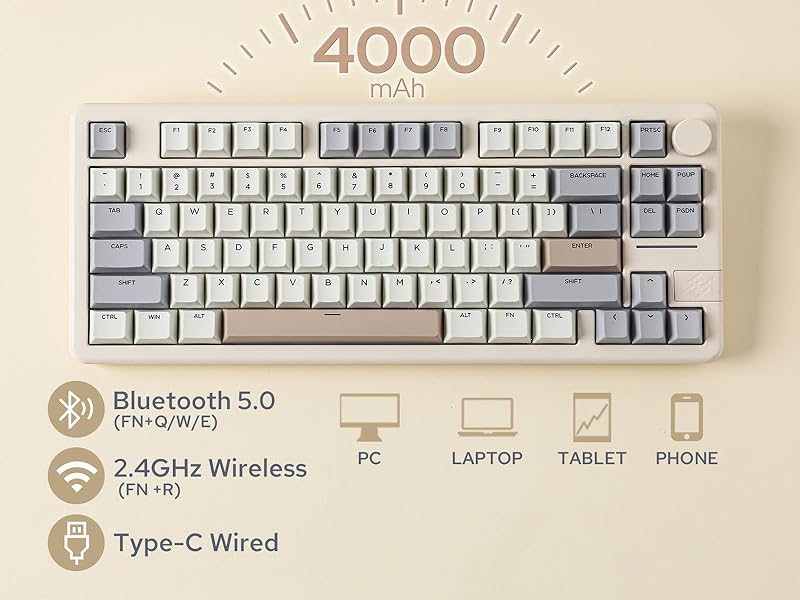
EPOMAKER Galaxy70 wireless mechanical keyboard can be connected via Bluetooth 5.0, 2.4GHz wireless, and USB-C wired connection. It can connect up to 5 devices simultaneously and easily switch between them using shortcut keys. The Galaxy70 computer keyboard is suitable for PCs, laptops, tablets, smartphones, PS, XBOX, and more, meeting all users' needs. Furthermore, this rechargeable keyboard is equipped with a large capacity battery of 4000mAh, providing a long battery life.
-
Bluetooth Mode
Pairing bluetooth
Toggle the switch to ON, make sure that the keyboard is under the wireless mode:
1. Hold Fn+Q/W/E for 3-5 seconds til the flash of the indicator light bar quickens from slow to quick blink in blue/red/green, and the keyboard is ready to pair.
2. Turn on your Bluetooth device and find "Galaxy70", then connect. When the keyboard is connected to the Bluetooth device, the indicator stops flashing and the connection is done.
3. Press Fn+ Q/W/E to toggle between the Bluetooth devices 1/2/3.
-
2.4ghz Wireless Mode
Pairing wireless 2.4ghz
Toggle the switch to ON, make sure that the keyboard is under the wireless mode:
1. Hold Fn+R for 3-5 seconds til the flash of the indicator light bar quickens from slow to quick blink in yellow
2. Insert the 2.4G dongle into your device. When the indicator stops, the connection is done.
Similar suggestions by Bolo
More from this brand
Similar items from “Gaming Keyboards”
Share with
Or share with link
https://www.bolo.bh/products/UO0Q37ZK7GO
Visit the EPOMAKER Store
EPOMAKER Galaxy70 Wireless Gaming Keyboard, 75% Aluminium Mechanical Keyboard, BT 5.0/2.4GHz/USB-C Wired, Programmable, Hot Swappable, for PC/Mac/Office/Gaming (White, Petal Switch)
Imported From: United States
At BOLO, we work hard to ensure the products you receive are new, genuine, and sourced from reputable suppliers.
Every product in the BOLO catalogue is sourced through our Verified Global Supply Network of verified sellers, authorized distributors or directly from the manufacturer.
Each product undergoes thorough inspection and verification at our consolidation and fulfilment centers to ensure it meets our strict authenticity and quality standards before being shipped and delivered to you.
If you ever have concerns regarding the authenticity of a product purchased from us, please contact Bolo Support. We will review your inquiry promptly and, if necessary, provide documentation verifying authenticity or offer a suitable resolution.
Your trust is our top priority, and we are committed to maintaining transparency and integrity in every transaction.
While we strive to display accurate information, variations in packaging, labeling, instructions, or formulation may occasionally occur due to regional differences or supplier updates. For detailed or manufacturer-specific information, please contact the brand directly or reach out to BOLO Support for assistance.
Unless otherwise stated, all prices displayed on the product page include applicable taxes and import duties.
BOLO operates in accordance with the laws and regulations of Bahrain. Any items found to be restricted or prohibited for sale within the Bahrain will be cancelled prior to shipment. We take proactive measures to ensure that only products permitted for sale in Bahrain are listed on our website.
All items are shipped by air, and any products classified as “Dangerous Goods (DG)” under IATA regulations will be removed from the order and cancelled.
All orders are processed manually, and we make every effort to process them promptly once confirmed. Products cancelled due to the above reasons will be permanently removed from listings across the website.
Description:
What's in the box
Details:
| Brand | EPOMAKER |
|---|---|
| Compatible Devices | Gaming Console, Laptop, PC, Smartphone, Tablet |
| Connectivity Technology | 2.4G Wireless, Bluetooth, USB-C |
| Keyboard Description | Gaming |
| Recommended Uses For Product | Business, Education, Everyday Use, Gaming, Personal, Student |
| Special Feature | CNC Aluminum Alloy Shell, Customizable Display Keys, Gasket-mounted, Hot-Swappable, RGB Backlights |
| Color | White |
| Keyboard backlighting color support | RGB |
| Style | Classic |
| Product Dimensions | 13.8"L x 5.55"W x 1.28"H |
-
Dye-sub PBT keycap in cherry profile
The dye-sub technique ensures vibrant and enduring colors, resists fading and wear over time
Battery Check
With battery-level inquiry function. It can detect the battery status at any time.
Tips: Available in wireless mode
Multimedia Control Knob
Galaxy70 is equipped with a control knob, rotate the knob to adjust the volume, and click the knob to play or pause.
Notes: Knobs cannot be customized
South-facing LEDs
With south-facing LEDs, the RGB lights show brighter and bring more fun for customization.
Packing List
Keyboard*1
Keyboard Cable*1
User Manual*1
Keycap Puller*1
Mechanical Switch*2
How to connect in wireless mode
-
Tri-Mode Connectivity
Bluetooth 5.0/2.4GHz Wireless/ USB-C Wired
EPOMAKER Galaxy70 wireless mechanical keyboard can be connected via Bluetooth 5.0, 2.4GHz wireless, and USB-C wired connection. It can connect up to 5 devices simultaneously and easily switch between them using shortcut keys. The Galaxy70 computer keyboard is suitable for PCs, laptops, tablets, smartphones, PS, XBOX, and more, meeting all users' needs. Furthermore, this rechargeable keyboard is equipped with a large capacity battery of 4000mAh, providing a long battery life.
-
Bluetooth Mode
Pairing bluetooth
Toggle the switch to ON, make sure that the keyboard is under the wireless mode:
1. Hold Fn+Q/W/E for 3-5 seconds til the flash of the indicator light bar quickens from slow to quick blink in blue/red/green, and the keyboard is ready to pair.
2. Turn on your Bluetooth device and find "Galaxy70", then connect. When the keyboard is connected to the Bluetooth device, the indicator stops flashing and the connection is done.
3. Press Fn+ Q/W/E to toggle between the Bluetooth devices 1/2/3.
-
2.4ghz Wireless Mode
Pairing wireless 2.4ghz
Toggle the switch to ON, make sure that the keyboard is under the wireless mode:
1. Hold Fn+R for 3-5 seconds til the flash of the indicator light bar quickens from slow to quick blink in yellow
2. Insert the 2.4G dongle into your device. When the indicator stops, the connection is done.
Similar suggestions by Bolo
More from this brand
Similar items from “Gaming Keyboards”
Share with
Or share with link
https://www.bolo.bh/products/UO0Q37ZK7GO