Description:
What's in the box
Details:
| Special Feature | CD Burner, DVD Burner, Plug & Play, Portable, Quiet |
|---|---|
| Hardware Interface | USB 3.0 |
| Brand | ORIGBELIE |
| Optical Storage Write Speed | Max 24xCD / 8xDVD |
| Optical Storage Read Speed | Max 24xCD / 8xDVD |
Visit the ORIGBELIE Store
ORIGBELIE External CD DVD Drive, 4 USB & 2 TF/SD Card Ports & Carrying Case
BHD2941
Quantity:
Order today to get by 7-14 business days
This item qualifies for free delivery
 Imported From: United States
At BOLO, we work hard to ensure the products you receive are new, genuine, and sourced from reputable suppliers.
Every product in the BOLO catalogue is sourced through our Verified Global Supply Network of verified sellers, authorized distributors or directly from the manufacturer.
Each product undergoes thorough inspection and verification at our consolidation and fulfilment centers to ensure it meets our strict authenticity and quality standards before being shipped and delivered to you.
If you ever have concerns regarding the authenticity of a product purchased from us, please contact Bolo Support. We will review your inquiry promptly and, if necessary, provide documentation verifying authenticity or offer a suitable resolution.
Your trust is our top priority, and we are committed to maintaining transparency and integrity in every transaction.
While we strive to display accurate information, variations in packaging, labeling, instructions, or formulation may occasionally occur due to regional differences or supplier updates. For detailed or manufacturer-specific information, please contact the brand directly or reach out to BOLO Support for assistance.
Unless otherwise stated, all prices displayed on the product page include applicable taxes and import duties.
BOLO operates in accordance with the laws and regulations of Bahrain. Any items found to be restricted or prohibited for sale within the Bahrain will be cancelled prior to shipment. We take proactive measures to ensure that only products permitted for sale in Bahrain are listed on our website.
All items are shipped by air, and any products classified as “Dangerous Goods (DG)” under IATA regulations will be removed from the order and cancelled.
All orders are processed manually, and we make every effort to process them promptly once confirmed. Products cancelled due to the above reasons will be permanently removed from listings across the website.

ORIGBELIE External CD/DVD Reader and Burner
Abandoning optical drives allows computer manufacturers to create thinner and more compact laptops. Most of the new notebooks on the market now do not built-in CD-ROM drive, and some only have a limited number of USB ports. In order to make laptops thinner and have higher transmission speeds, some even only have Type C ports. But we may have a large collection of 90s CDs, and we want to put them in a laptop to feel the nostalgia or insert a DVD collection to watch movies. Or, you may just need a CD/DVD drive for emergencies, such as data transfer, system backup, etc.
Fortunately, We have already done all the work for you. This multi-function 2 in 1 USB A/USB C data cable external USB 3.0 disc drive that we launched is not only a CD/DVD reader, but also it has the function of CD/DVD burner. At the same time, it is equipped with a variety of USB ports and SD/TF card slots to meet all your peripheral equipment needs - all for a decent price. This will allow you to have more budget to buy the latest laptops that are comfortable, smooth, and have powerful processors and graphics cards.
THESE THINGS YOU NEED TO KNOW BEFORE BUYING - This dvd rw drive can only start its job after it is connected to a laptop or a desktop, so it is not compatible with TVs, cars, trucks, projectors, tablets, iPads, phones, PS4/5, Xbox, Nintendo Switch, surface (some model), etc. In addition, it is compatible with Windows11/10/8/7/XP/Vista, Mac OS and Linux. Not compatible with Chrome OS, Ubuntu system and Blu-ray disc.

With this USB external CD/DVD RW Drive, you can read movies DVDs, play music CDs, burn and rip discs, copy photos, install software/games/system, backup data and more. And just slips easily into your travel bag, perfect companion for DVD lovers, using everywhere.

RGB LED Indicator Light
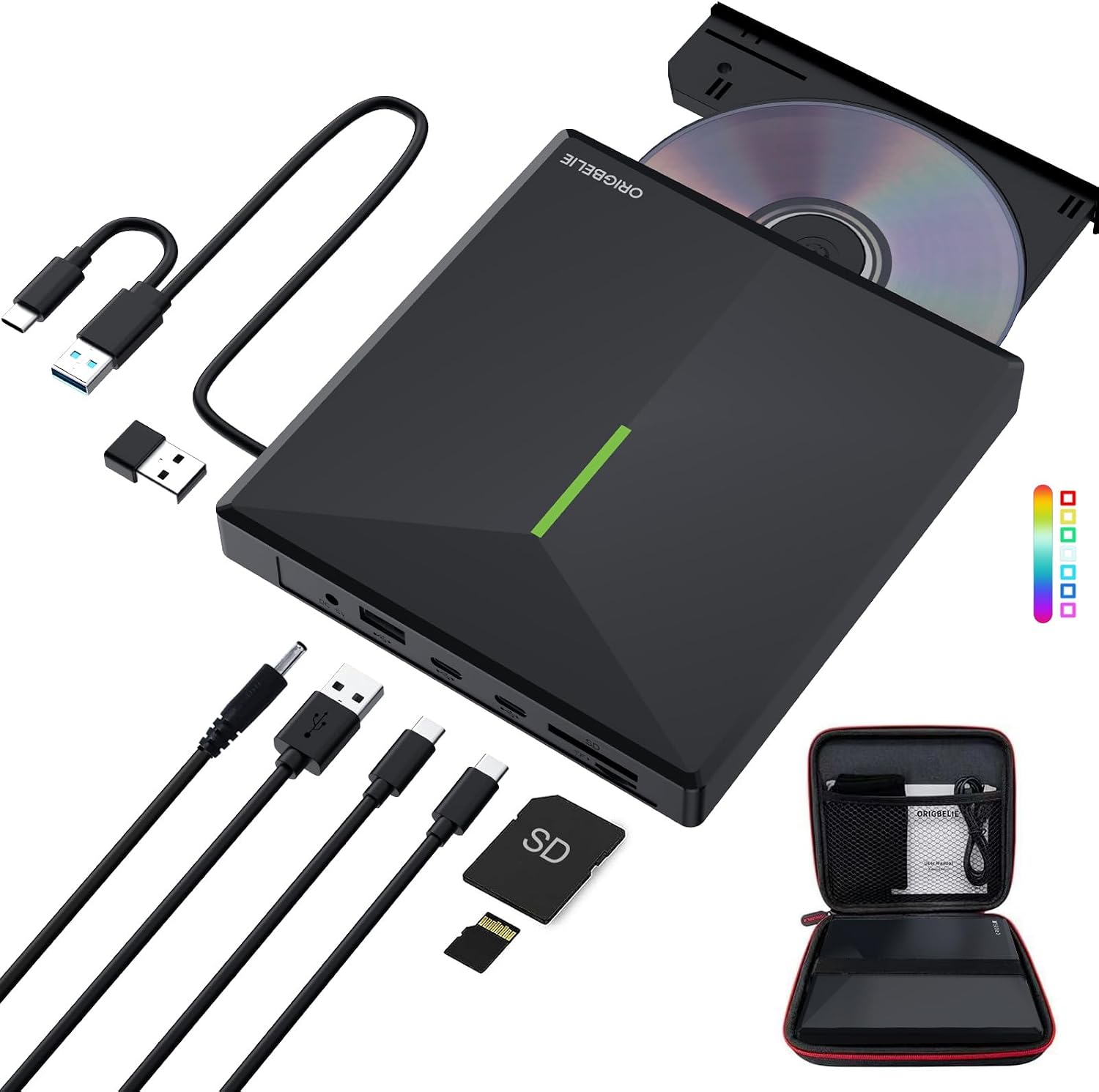
It come with the latest RGB LED color gradient indicator light. Cool RGB LED indicator light that can cycle and gradually change colors. Its dynamic changes make you feel happy and make your usb disk drive full of technology.

2-in-1 USB 3.0 Connector
Equipped with USB-C and USB-A connectors make it easier to connect to more laptops and desktop computers, no USB hub/adapter required. Plug and Play.

6 in 1 USB 3.0 Hub
It is not only CD/DVD burner, but also a USB 3.0 hub, including USB A 3.0 port*1, USB A 2.0 port*1, USB C port*2, TF card slot*1, SD card slot*1. Extra built-in SD/TF card reader is perfect for you to transfer photos shooting or videos by your camera from memory cards to your computers.

Package Contain
- External CD/DVD Drive * 1
- User Manual * 1
- USB A to DC Power Supply Cable * 1
- DVD Drive Storage Bag * 1
- USB DVD Drive Carrying Case * 1

Some things to note about this USB 3.0 CD ROM external drive
1.The dvd drive should be connected with USB port on laptop rather than connect with USB HUB. In addition, please connect the item with USB port behind of computer host if you use a desktop.
2.Ensure CDs is placed well and not scratched. The raised fixing post in the middle of the CD drive tray has three spring buckles. You need to gently press the CD disc into the spring buckles to secure the disc.
3.Make sure your computer's CD/DVD driver is intact before using an external optical drive. The computer operating system comes with a CD/DVD driver. If the program is damaged or removed, the CD/DVD driver needs to be updated or reinstalled.
4.Setting the DVD Region to USA on the "DVD RW Drive" - Properties - click Hardware Tab - click Properties button - then choose country Region (USA is 1) and click OK to apply. Note: You are only allowed to change the region code 4-5 times.
5.It's better to use the 5V charger/power bank to increase the power if your devices don't have enough power to support the external drive.
6.Insert the external optical drive into the computer. After the Windows system recognizes the optical drive, the "DVD RW Drive" icon will be displayed. The Mac OS computer will not display the device icon until the disc is placed in the optical drive and the disc is read successfully.
7.WINDOWS 11 needs a media player (such as VLC ) and a network connection.
8.Computers often do not natively support DVD movie playing, so a third-party media player (such as VLC) must be downloaded and installed to watch DVDs using this CD/DVD player. You can download and install a playing/burning software you like. You can also refer to the following software:
DVD player software: Any Media Player, Any DVD; Burning software for Windows operating systems: InfraRecorder, Ones, Express Disc Burner; Burning software for Mac OS: Burn for mac; Burning software for Linux OS/Unix OS: K3b (KDE Burn Baby Burn)
9.Because the video formats of most computers and mobile phones are not compatible with DVD, you need third-party software to convert the file format to a format that can be displayed on the disc, otherwise, even if you burn the file to a disc, it will not work.
10.The Mac OS system comes with a burning function:
Connect the optical drive and put the disc into it - click "File" on the top menu bar - click on the new "Burn Folder" - drag the files to be burned into the "Burn Folder" - click "Burn to Disc" - and then You can eject the disc. But one thing to note is that Mac OS computers can only burn blank discs, and a disc can only be burned once.
11.For the Mac OS, you need to eject the disc through the Mac OS command. At this time, pressing the eject key of the external optical drive will not work.

For troubleshooting steps
Please check if your computer is recognizes to the optical drive (if your computer recognizes the optical drive, you can see the icon of "DVD RW Drive" in your computer's "My Computer". The Mac OS computer will not display the device icon until the disc is placed in the optical drive and the disc is read successfully. ).
If the optical drive is not recognized by the computer, the following are suggestions for solutions.
*Method 1:Check external connections.
1. Use the Type A and Type C cables on the back of the machine to connect the laptop. (The cable comes with the package is only for current transmission, not for data transmission.)
2. Connect the machine to other USB ports.
*Method 2: Update or reinstall the driver.
Drivers for your CD, DVD drive is included within the Operating System and hence does not require you to install a specific driver. Uninstalling the driver and restarting the computer will reinstall the driver which will resolve most issues related to the device driver.
*Method 3: Run the Hardware and Devices troubleshooter.(Windows 7, Windows 8, Windows 8.1 and Windows 10)
You can run the Windows Hardware and Devices troubleshooter which is built-in to Microsoft Windows. The Hardware and Devices troubleshooter is available in Microsoft Windows 7, Windows 8/8.1 & Windows 10 only.
If the optical drive is recognized by the computer, the product problem you encounter may be caused by the following two reasons:
1. The power supply of the product is insufficient - Please use a 5V charger / power bank supply to supplement it.
(Note: For the Apple computers, you need to connect the external CD/DVD drive to the computer first, and then connect the supplementary power supply to the external CD/DVD drive, otherwise the Apple computer will not recognize the external CD/DVD drive.)
2. WINDOWS 11 needs a media player (such as VLC ) and a network connection.
More from this brand
Similar items from “CD & DVD Drives”
Share with
Or share with link
https://www.bolo.bh/products/UO0PY37DI7C
Visit the ORIGBELIE Store
ORIGBELIE External CD DVD Drive, 4 USB & 2 TF/SD Card Ports & Carrying Case
BHD2941
Quantity:
Order today to get by 7-14 business days
This item qualifies for free delivery
Imported From: United States
At BOLO, we work hard to ensure the products you receive are new, genuine, and sourced from reputable suppliers.
Every product in the BOLO catalogue is sourced through our Verified Global Supply Network of verified sellers, authorized distributors or directly from the manufacturer.
Each product undergoes thorough inspection and verification at our consolidation and fulfilment centers to ensure it meets our strict authenticity and quality standards before being shipped and delivered to you.
If you ever have concerns regarding the authenticity of a product purchased from us, please contact Bolo Support. We will review your inquiry promptly and, if necessary, provide documentation verifying authenticity or offer a suitable resolution.
Your trust is our top priority, and we are committed to maintaining transparency and integrity in every transaction.
While we strive to display accurate information, variations in packaging, labeling, instructions, or formulation may occasionally occur due to regional differences or supplier updates. For detailed or manufacturer-specific information, please contact the brand directly or reach out to BOLO Support for assistance.
Unless otherwise stated, all prices displayed on the product page include applicable taxes and import duties.
BOLO operates in accordance with the laws and regulations of Bahrain. Any items found to be restricted or prohibited for sale within the Bahrain will be cancelled prior to shipment. We take proactive measures to ensure that only products permitted for sale in Bahrain are listed on our website.
All items are shipped by air, and any products classified as “Dangerous Goods (DG)” under IATA regulations will be removed from the order and cancelled.
All orders are processed manually, and we make every effort to process them promptly once confirmed. Products cancelled due to the above reasons will be permanently removed from listings across the website.
Description:
What's in the box
Details:
| Special Feature | CD Burner, DVD Burner, Plug & Play, Portable, Quiet |
|---|---|
| Hardware Interface | USB 3.0 |
| Brand | ORIGBELIE |
| Optical Storage Write Speed | Max 24xCD / 8xDVD |
| Optical Storage Read Speed | Max 24xCD / 8xDVD |
ORIGBELIE External CD/DVD Reader and Burner
Abandoning optical drives allows computer manufacturers to create thinner and more compact laptops. Most of the new notebooks on the market now do not built-in CD-ROM drive, and some only have a limited number of USB ports. In order to make laptops thinner and have higher transmission speeds, some even only have Type C ports. But we may have a large collection of 90s CDs, and we want to put them in a laptop to feel the nostalgia or insert a DVD collection to watch movies. Or, you may just need a CD/DVD drive for emergencies, such as data transfer, system backup, etc.
Fortunately, We have already done all the work for you. This multi-function 2 in 1 USB A/USB C data cable external USB 3.0 disc drive that we launched is not only a CD/DVD reader, but also it has the function of CD/DVD burner. At the same time, it is equipped with a variety of USB ports and SD/TF card slots to meet all your peripheral equipment needs - all for a decent price. This will allow you to have more budget to buy the latest laptops that are comfortable, smooth, and have powerful processors and graphics cards.
THESE THINGS YOU NEED TO KNOW BEFORE BUYING - This dvd rw drive can only start its job after it is connected to a laptop or a desktop, so it is not compatible with TVs, cars, trucks, projectors, tablets, iPads, phones, PS4/5, Xbox, Nintendo Switch, surface (some model), etc. In addition, it is compatible with Windows11/10/8/7/XP/Vista, Mac OS and Linux. Not compatible with Chrome OS, Ubuntu system and Blu-ray disc.
With this USB external CD/DVD RW Drive, you can read movies DVDs, play music CDs, burn and rip discs, copy photos, install software/games/system, backup data and more. And just slips easily into your travel bag, perfect companion for DVD lovers, using everywhere.
RGB LED Indicator Light
It come with the latest RGB LED color gradient indicator light. Cool RGB LED indicator light that can cycle and gradually change colors. Its dynamic changes make you feel happy and make your usb disk drive full of technology.
2-in-1 USB 3.0 Connector
Equipped with USB-C and USB-A connectors make it easier to connect to more laptops and desktop computers, no USB hub/adapter required. Plug and Play.
6 in 1 USB 3.0 Hub
It is not only CD/DVD burner, but also a USB 3.0 hub, including USB A 3.0 port*1, USB A 2.0 port*1, USB C port*2, TF card slot*1, SD card slot*1. Extra built-in SD/TF card reader is perfect for you to transfer photos shooting or videos by your camera from memory cards to your computers.
Package Contain
- External CD/DVD Drive * 1
- User Manual * 1
- USB A to DC Power Supply Cable * 1
- DVD Drive Storage Bag * 1
- USB DVD Drive Carrying Case * 1
Some things to note about this USB 3.0 CD ROM external drive
1.The dvd drive should be connected with USB port on laptop rather than connect with USB HUB. In addition, please connect the item with USB port behind of computer host if you use a desktop.
2.Ensure CDs is placed well and not scratched. The raised fixing post in the middle of the CD drive tray has three spring buckles. You need to gently press the CD disc into the spring buckles to secure the disc.
3.Make sure your computer's CD/DVD driver is intact before using an external optical drive. The computer operating system comes with a CD/DVD driver. If the program is damaged or removed, the CD/DVD driver needs to be updated or reinstalled.
4.Setting the DVD Region to USA on the "DVD RW Drive" - Properties - click Hardware Tab - click Properties button - then choose country Region (USA is 1) and click OK to apply. Note: You are only allowed to change the region code 4-5 times.
5.It's better to use the 5V charger/power bank to increase the power if your devices don't have enough power to support the external drive.
6.Insert the external optical drive into the computer. After the Windows system recognizes the optical drive, the "DVD RW Drive" icon will be displayed. The Mac OS computer will not display the device icon until the disc is placed in the optical drive and the disc is read successfully.
7.WINDOWS 11 needs a media player (such as VLC ) and a network connection.
8.Computers often do not natively support DVD movie playing, so a third-party media player (such as VLC) must be downloaded and installed to watch DVDs using this CD/DVD player. You can download and install a playing/burning software you like. You can also refer to the following software:
DVD player software: Any Media Player, Any DVD; Burning software for Windows operating systems: InfraRecorder, Ones, Express Disc Burner; Burning software for Mac OS: Burn for mac; Burning software for Linux OS/Unix OS: K3b (KDE Burn Baby Burn)
9.Because the video formats of most computers and mobile phones are not compatible with DVD, you need third-party software to convert the file format to a format that can be displayed on the disc, otherwise, even if you burn the file to a disc, it will not work.
10.The Mac OS system comes with a burning function:
Connect the optical drive and put the disc into it - click "File" on the top menu bar - click on the new "Burn Folder" - drag the files to be burned into the "Burn Folder" - click "Burn to Disc" - and then You can eject the disc. But one thing to note is that Mac OS computers can only burn blank discs, and a disc can only be burned once.
11.For the Mac OS, you need to eject the disc through the Mac OS command. At this time, pressing the eject key of the external optical drive will not work.
For troubleshooting steps
Please check if your computer is recognizes to the optical drive (if your computer recognizes the optical drive, you can see the icon of "DVD RW Drive" in your computer's "My Computer". The Mac OS computer will not display the device icon until the disc is placed in the optical drive and the disc is read successfully. ).
If the optical drive is not recognized by the computer, the following are suggestions for solutions.
*Method 1:Check external connections.
1. Use the Type A and Type C cables on the back of the machine to connect the laptop. (The cable comes with the package is only for current transmission, not for data transmission.)
2. Connect the machine to other USB ports.
*Method 2: Update or reinstall the driver.
Drivers for your CD, DVD drive is included within the Operating System and hence does not require you to install a specific driver. Uninstalling the driver and restarting the computer will reinstall the driver which will resolve most issues related to the device driver.
*Method 3: Run the Hardware and Devices troubleshooter.(Windows 7, Windows 8, Windows 8.1 and Windows 10)
You can run the Windows Hardware and Devices troubleshooter which is built-in to Microsoft Windows. The Hardware and Devices troubleshooter is available in Microsoft Windows 7, Windows 8/8.1 & Windows 10 only.
If the optical drive is recognized by the computer, the product problem you encounter may be caused by the following two reasons:
1. The power supply of the product is insufficient - Please use a 5V charger / power bank supply to supplement it.
(Note: For the Apple computers, you need to connect the external CD/DVD drive to the computer first, and then connect the supplementary power supply to the external CD/DVD drive, otherwise the Apple computer will not recognize the external CD/DVD drive.)
2. WINDOWS 11 needs a media player (such as VLC ) and a network connection.
More from this brand
Similar items from “CD & DVD Drives”
Share with
Or share with link
https://www.bolo.bh/products/UO0PY37DI7C