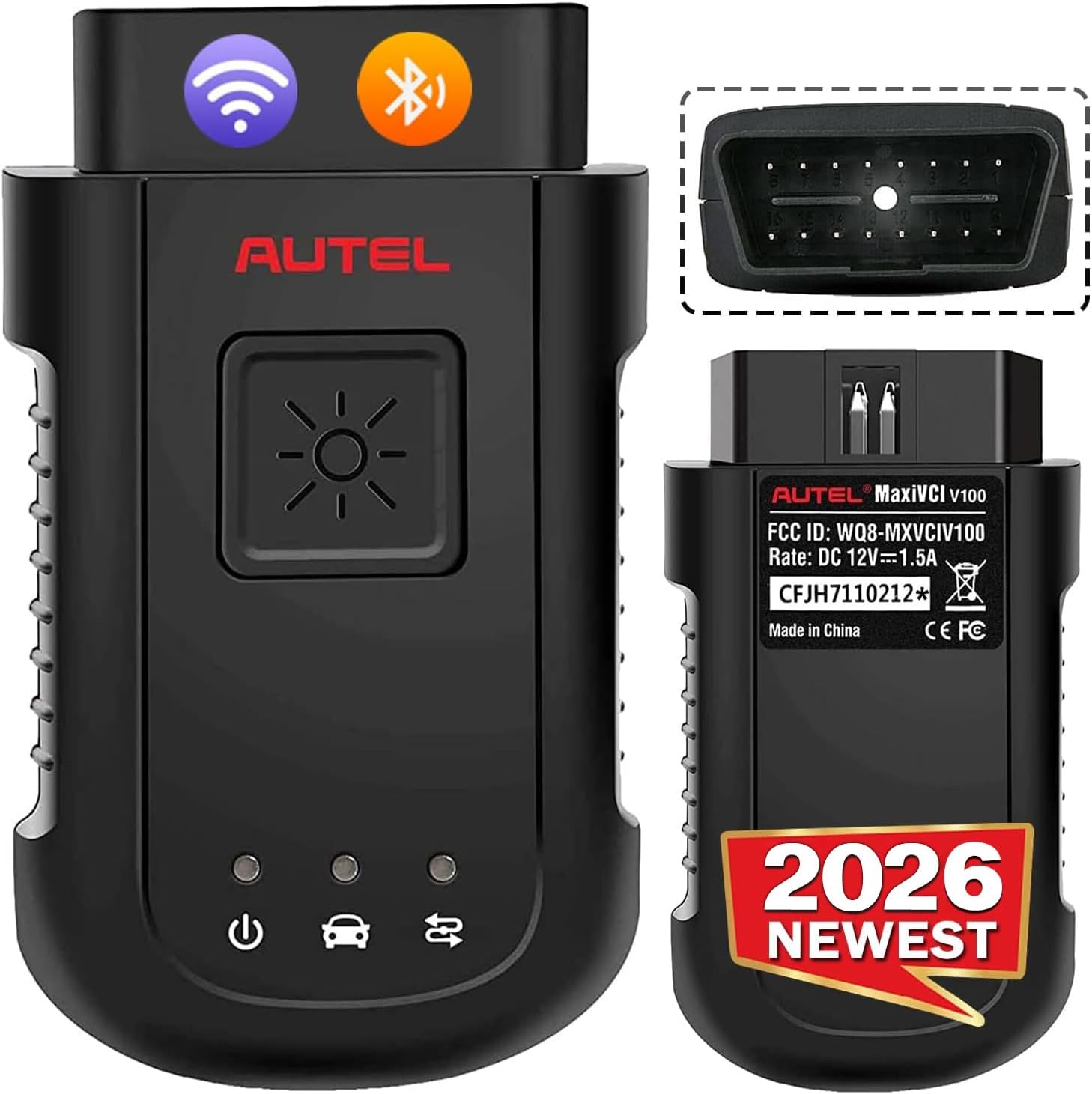
Description:
What's in the box
Details:
| Brand | Autel |
|---|---|
| Power Source | Connect with Car |
| Operating System | Android 4.4 |
| Automotive Fit Type | Universal Fit |
| Item Highlight | 2026 VCI 100 Work with Autel Scanner MS906BT MK906BT MS906TS, OBD2 Connector Adapter Dongle |
Visit the Autel Store
Autel MaxiSYS VCI100 Wireless Diagnostic Interface, MaxiVCI V100 VCI Dongle
BHD20540
Quantity:
Order today to get by 7-14 business days
This item qualifies for free delivery
 Imported From: United States
At BOLO, we work hard to ensure the products you receive are new, genuine, and sourced from reputable suppliers.
Every product in the BOLO catalogue is sourced through our Verified Global Supply Network of verified sellers, authorized distributors or directly from the manufacturer.
Each product undergoes thorough inspection and verification at our consolidation and fulfilment centers to ensure it meets our strict authenticity and quality standards before being shipped and delivered to you.
If you ever have concerns regarding the authenticity of a product purchased from us, please contact Bolo Support. We will review your inquiry promptly and, if necessary, provide documentation verifying authenticity or offer a suitable resolution.
Your trust is our top priority, and we are committed to maintaining transparency and integrity in every transaction.
While we strive to display accurate information, variations in packaging, labeling, instructions, or formulation may occasionally occur due to regional differences or supplier updates. For detailed or manufacturer-specific information, please contact the brand directly or reach out to BOLO Support for assistance.
Unless otherwise stated, all prices displayed on the product page include applicable taxes and import duties.
BOLO operates in accordance with the laws and regulations of Bahrain. Any items found to be restricted or prohibited for sale within the Bahrain will be cancelled prior to shipment. We take proactive measures to ensure that only products permitted for sale in Bahrain are listed on our website.
All items are shipped by air, and any products classified as “Dangerous Goods (DG)” under IATA regulations will be removed from the order and cancelled.
All orders are processed manually, and we make every effort to process them promptly once confirmed. Products cancelled due to the above reasons will be permanently removed from listings across the website.

Work with Autel MS906BT/ MS906TS/ MK906BT
The wireless diagnostic interface MaxiVCI V100 is a small vehicle communication interface (VCI) used to connect to a vehicle’s diagnostic connector (DLC) with the Display scanner, as well as standalone P-C, as a vehicle communication interface (VCI) for vehicle data transmission.
Autel MaxiVCI VCI100 Features:
- 98.4 feet ultra-distance diagnosis, no longer limited to the 1-meter wired diagnosis distance
- Reduce communication time and ensure utility
- Superfast OBDII port communication, fast and stable, safe and efficient, low energy consumption.
- Wirelessly connects ECU to perform ECU Coding, Full TPMS, Bi-directional Control, Services etc.

Easy 3 Steps in Two Way
There are 3 Steps to perform OBD II Vehicle Connection:
- Step 1: Insert the MaxiVCI V100 on the vehicle’s DLC
- Step 2: Power up MS906BT/ MS906TS/ MK906BT
- Steps 3: Turn on scanner icon, connect with VCI100.
To connect to a Non-OBD II Vehicle
- 1. Locate the required OBD I adapter and connect its 16-pin jack to the Vehicle Data Connector on the MaxiVCI V100.
- 2. Connect the attached OBD I adapter to the vehicle’s DLC.
USB Cable Connection:
After VCI100 connected with DLC, you can also use USB Cable to conect with Autel scaner,
NOTE: When both the communication methods are applied at the same time, the MaxiCOM system will use the USB communication as the default priority.
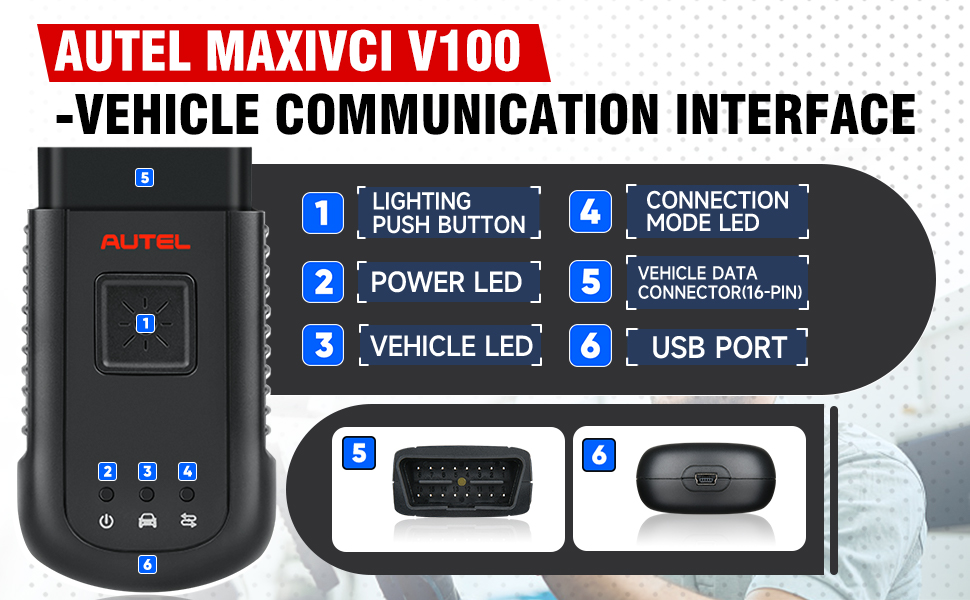
- 1. Lighting Push Button – presses to turn on the white LED in the vehicle data connector socket
- 2. Power LED – indicates power and system status
- Green: illuminates solid green when powered on.
- Amber: flashes green and amber automatically when performing firmware update.
- Red: illuminates red automatically when powered up, and flashes red when system failure occurs.
- 3. Vehicle LED – flashes green when communicating with the vehicle’s system
- 4. Connection Mode LED – illuminates solid green when the device is properly connected with the Display scanner or P-C via the USB cable, or illuminates solid blue via wireless connection
- 5. Vehicle Data Connector (16-pin)
- 6. USB Port
The Wireless Diagnostic Interface supports both the wireless and the USB communication. It can transmit vehicle data to the Display scanner with or without a physical connection. The working range of the transmitter through communication is about 98.4 feet (about 30 m). A signal lost due to moving out of range automatically restores itself when the Display scanner is brought closer to the VCI unit.

Extension Vehicle Coverage
- When VCI 100 vehicle communication adapter connected to the scanner, it can perform system-wide diagnostic functions on 99% vehicles in the U.S., Europe and Asia to clear DTC and quickly troubleshoot faults.

Wireless Connect
- With stable connection, the V100 doubles the data transmission rate and further speeds up the diagnostic pace, which is a best choice for technician and repair workshops.

Support Multi-Automotive Protocols
- Such as L-Line,Flashing Code, SAE-J1850 VPW, SAE-J1850 PWM, CAN ISO 11898, UART Echo Byte Protocol, Honda Diag-H Protocol, TP 2.0, TP 1.6, SAE J1939, SAE J1708, Fault-Tolerant CAN

More from this brand
Similar items from “Code Readers & Scan Tools”
Share with
Or share with link
https://www.bolo.bh/products/UO0OY79G62C
Visit the Autel Store
Autel MaxiSYS VCI100 Wireless Diagnostic Interface, MaxiVCI V100 VCI Dongle
BHD20540
Quantity:
Order today to get by 7-14 business days
This item qualifies for free delivery
Imported From: United States
At BOLO, we work hard to ensure the products you receive are new, genuine, and sourced from reputable suppliers.
Every product in the BOLO catalogue is sourced through our Verified Global Supply Network of verified sellers, authorized distributors or directly from the manufacturer.
Each product undergoes thorough inspection and verification at our consolidation and fulfilment centers to ensure it meets our strict authenticity and quality standards before being shipped and delivered to you.
If you ever have concerns regarding the authenticity of a product purchased from us, please contact Bolo Support. We will review your inquiry promptly and, if necessary, provide documentation verifying authenticity or offer a suitable resolution.
Your trust is our top priority, and we are committed to maintaining transparency and integrity in every transaction.
While we strive to display accurate information, variations in packaging, labeling, instructions, or formulation may occasionally occur due to regional differences or supplier updates. For detailed or manufacturer-specific information, please contact the brand directly or reach out to BOLO Support for assistance.
Unless otherwise stated, all prices displayed on the product page include applicable taxes and import duties.
BOLO operates in accordance with the laws and regulations of Bahrain. Any items found to be restricted or prohibited for sale within the Bahrain will be cancelled prior to shipment. We take proactive measures to ensure that only products permitted for sale in Bahrain are listed on our website.
All items are shipped by air, and any products classified as “Dangerous Goods (DG)” under IATA regulations will be removed from the order and cancelled.
All orders are processed manually, and we make every effort to process them promptly once confirmed. Products cancelled due to the above reasons will be permanently removed from listings across the website.
Description:
What's in the box
Details:
| Brand | Autel |
|---|---|
| Power Source | Connect with Car |
| Operating System | Android 4.4 |
| Automotive Fit Type | Universal Fit |
| Item Highlight | 2026 VCI 100 Work with Autel Scanner MS906BT MK906BT MS906TS, OBD2 Connector Adapter Dongle |
Work with Autel MS906BT/ MS906TS/ MK906BT
The wireless diagnostic interface MaxiVCI V100 is a small vehicle communication interface (VCI) used to connect to a vehicle’s diagnostic connector (DLC) with the Display scanner, as well as standalone P-C, as a vehicle communication interface (VCI) for vehicle data transmission.
Autel MaxiVCI VCI100 Features:
- 98.4 feet ultra-distance diagnosis, no longer limited to the 1-meter wired diagnosis distance
- Reduce communication time and ensure utility
- Superfast OBDII port communication, fast and stable, safe and efficient, low energy consumption.
- Wirelessly connects ECU to perform ECU Coding, Full TPMS, Bi-directional Control, Services etc.
Easy 3 Steps in Two Way
There are 3 Steps to perform OBD II Vehicle Connection:
- Step 1: Insert the MaxiVCI V100 on the vehicle’s DLC
- Step 2: Power up MS906BT/ MS906TS/ MK906BT
- Steps 3: Turn on scanner icon, connect with VCI100.
To connect to a Non-OBD II Vehicle
- 1. Locate the required OBD I adapter and connect its 16-pin jack to the Vehicle Data Connector on the MaxiVCI V100.
- 2. Connect the attached OBD I adapter to the vehicle’s DLC.
USB Cable Connection:
After VCI100 connected with DLC, you can also use USB Cable to conect with Autel scaner,
NOTE: When both the communication methods are applied at the same time, the MaxiCOM system will use the USB communication as the default priority.
- 1. Lighting Push Button – presses to turn on the white LED in the vehicle data connector socket
- 2. Power LED – indicates power and system status
- Green: illuminates solid green when powered on.
- Amber: flashes green and amber automatically when performing firmware update.
- Red: illuminates red automatically when powered up, and flashes red when system failure occurs.
- 3. Vehicle LED – flashes green when communicating with the vehicle’s system
- 4. Connection Mode LED – illuminates solid green when the device is properly connected with the Display scanner or P-C via the USB cable, or illuminates solid blue via wireless connection
- 5. Vehicle Data Connector (16-pin)
- 6. USB Port
The Wireless Diagnostic Interface supports both the wireless and the USB communication. It can transmit vehicle data to the Display scanner with or without a physical connection. The working range of the transmitter through communication is about 98.4 feet (about 30 m). A signal lost due to moving out of range automatically restores itself when the Display scanner is brought closer to the VCI unit.
Extension Vehicle Coverage
- When VCI 100 vehicle communication adapter connected to the scanner, it can perform system-wide diagnostic functions on 99% vehicles in the U.S., Europe and Asia to clear DTC and quickly troubleshoot faults.
Wireless Connect
- With stable connection, the V100 doubles the data transmission rate and further speeds up the diagnostic pace, which is a best choice for technician and repair workshops.
Support Multi-Automotive Protocols
- Such as L-Line,Flashing Code, SAE-J1850 VPW, SAE-J1850 PWM, CAN ISO 11898, UART Echo Byte Protocol, Honda Diag-H Protocol, TP 2.0, TP 1.6, SAE J1939, SAE J1708, Fault-Tolerant CAN
More from this brand
Similar items from “Code Readers & Scan Tools”
Share with
Or share with link
https://www.bolo.bh/products/UO0OY79G62C