Description:
What's in the box
Details:
| Brand | PEMP |
|---|---|
| Connectivity Technology | Bluetooth |
| Controller Type | Hand Control |
| Special Feature | Built-In Bluetooth, Touchscreen |
| Compatible Devices | Smartphone |
| Connector Type | 2 Ways Usb |
| Audio Output Mode | Stereo |
| Surround Sound Channel Configuration | 4 |
| Color | Linux F30 F48 EVO |
| Product Dimensions | 25"D x 11.3"W x 5.7"H |
Visit the PEMP Store
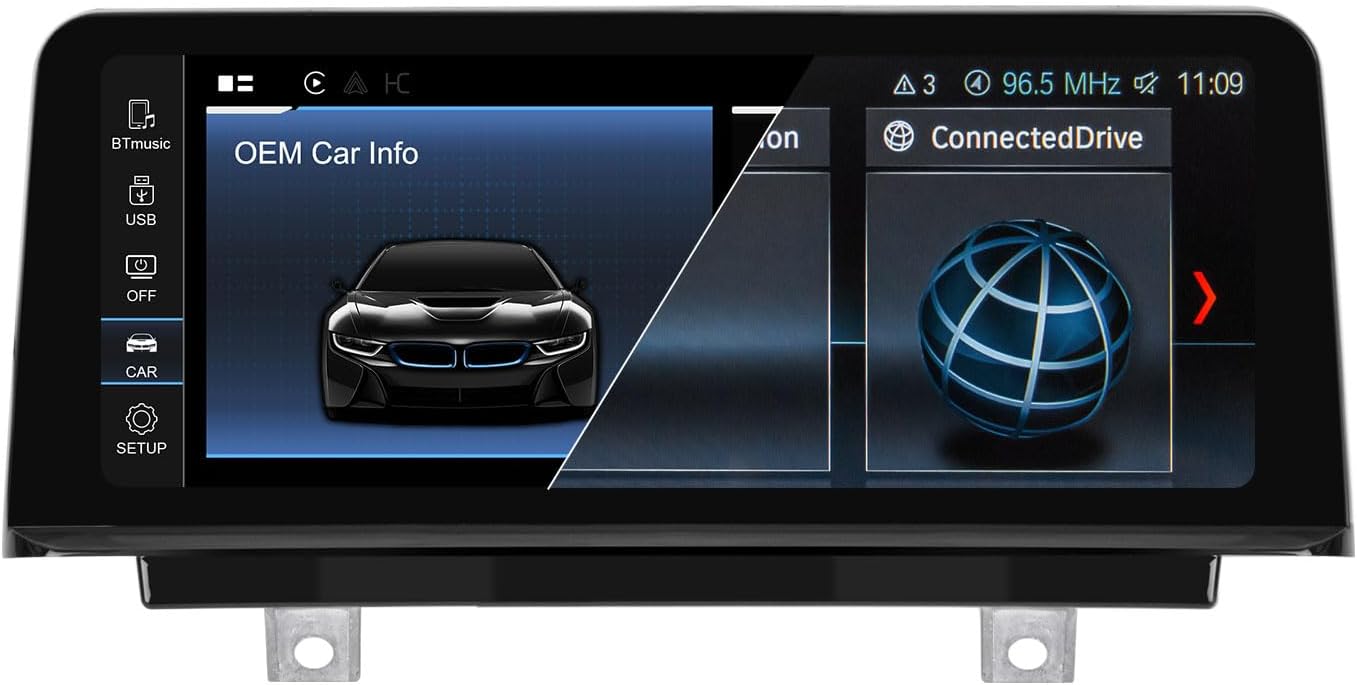
PEMP Linux Screen for BMW 3 Series F30 X1 F48 2017-2019 EVO ID6, Support Wireless CarPlay Android Auto Using OEM Bluetooth Calling and Music
BHD21141


Quantity:
Order today to get by 7-14 business days
This item qualifies for free delivery
 Imported From: United States
At BOLO, we work hard to ensure the products you receive are new, genuine, and sourced from reputable suppliers.
Every product in the BOLO catalogue is sourced through our Verified Global Supply Network of verified sellers, authorized distributors or directly from the manufacturer.
Each product undergoes thorough inspection and verification at our consolidation and fulfilment centers to ensure it meets our strict authenticity and quality standards before being shipped and delivered to you.
If you ever have concerns regarding the authenticity of a product purchased from us, please contact Bolo Support. We will review your inquiry promptly and, if necessary, provide documentation verifying authenticity or offer a suitable resolution.
Your trust is our top priority, and we are committed to maintaining transparency and integrity in every transaction.
While we strive to display accurate information, variations in packaging, labeling, instructions, or formulation may occasionally occur due to regional differences or supplier updates. For detailed or manufacturer-specific information, please contact the brand directly or reach out to BOLO Support for assistance.
Unless otherwise stated, all prices displayed on the product page include applicable taxes and import duties.
BOLO operates in accordance with the laws and regulations of Bahrain. Any items found to be restricted or prohibited for sale within the Bahrain will be cancelled prior to shipment. We take proactive measures to ensure that only products permitted for sale in Bahrain are listed on our website.
All items are shipped by air, and any products classified as “Dangerous Goods (DG)” under IATA regulations will be removed from the order and cancelled.
All orders are processed manually, and we make every effort to process them promptly once confirmed. Products cancelled due to the above reasons will be permanently removed from listings across the website.

Wireless and wired Carplay for bmw F30 F48 EVO
Built-in wireless and wired Carplay, Wired CarPlay need connect the USB IN 1.

Wireless and wired android auto for bmw F30 F48 EVO
Built-in Wireless and Wired android auto, Wired Android auto need connect the USB IN 1.

Wired and wireless Mirror link for bmw F30 F48 EVO
Built-in Wired and wireless Mirror link, Wired Mirror link need connect the USB IN 1.

Why can't get OEM car info and Sound?
Please resolve the sound and Car OEM Car info you are currently experiencing based on the two scenarios above.

Move the original host fiber optic cable to the new harness
If your OEM radio has a fiber optic cable above the power harness, Pls move it to the new harness. Otherwise you can't get the car information and the Linux CarPlay sound. And it will be accompanied by a heartbeat wheezing sound.
If your original automotive fiber optic cable is too short, you can purchase this ASIN: B0FF9TSB9R
Fiber optic extension cable solves the problem of too short fiber optic cable.

Use the OEM Bluetooth to Calling in CarPlay Android auto
If your vehicle is equipped with factory-installed Bluetooth, please use the factory Bluetooth system for calls when using CarPlay or Android Auto. There will be no echo, and the sound quality will be clear.
For instructions on how to stream audio via factory Bluetooth, you can watch this video on YouTube: P8GwY2yZV9o
Note: You must switch the media source to your vehicle’s Bluetooth to stream audio.

Need use the USB IN1 Connect the Wired Function
Be sure to use USB IN 1 to connect the wired CarPlay Android auto and Mirror link function.

Set the OEM Resolution
Please select the correct resolution for the OEM display within the settings, otherwise the OEM Car INFO may not display properly.
Setup>Car Settings> Original Car's Screen Resolution> Select the item
Support the OEM or after-market Camera
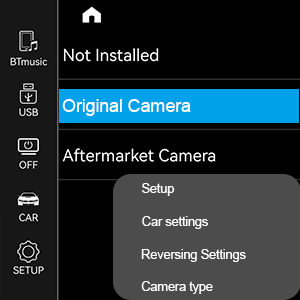
Please select the correct camera option within Settings, Select Original Camera if it is a factory camera. Select Aftermarket Camera, if you are installing an aftermarket camera.

Please focus on testing LVDS and automotive systems on the back of OEM screens for automotive industry
This is a very important notice:
1. Please check your original system using the original screen’s user interface.
2. Please remove the rear cover of the OEM screen to check the LVDS cable configuration.
3. If your OEM screen system uses a 6-pin LVDS connector (compatible with ID5 and ID6 EVO systems), this screen is compatible with your vehicle.
4. If your system uses a 6-pin CIC system or a 6-pin ID4-NBT system, this screen is not compatible with your vehicle.

For Airplay and USB music sound, a separate USBAUX box and AUX cable are required.
NOTE:
Airplay and USB flash drive music video features do not support sound from the car OEM Bluetoth.
If you need sound from both functions, purchase the USBAUX box and AUX cable separately.
Search ASIN: B0FK4NLW83
More from this brand
Similar items from “In-Dash Navigation”
Share with
Or share with link
https://www.bolo.bh/products/UO09XKLE4E5
Visit the PEMP Store
PEMP Linux Screen for BMW 3 Series F30 X1 F48 2017-2019 EVO ID6, Support Wireless CarPlay Android Auto Using OEM Bluetooth Calling and Music
BHD21141
Quantity:
Order today to get by 7-14 business days
This item qualifies for free delivery
Imported From: United States
At BOLO, we work hard to ensure the products you receive are new, genuine, and sourced from reputable suppliers.
Every product in the BOLO catalogue is sourced through our Verified Global Supply Network of verified sellers, authorized distributors or directly from the manufacturer.
Each product undergoes thorough inspection and verification at our consolidation and fulfilment centers to ensure it meets our strict authenticity and quality standards before being shipped and delivered to you.
If you ever have concerns regarding the authenticity of a product purchased from us, please contact Bolo Support. We will review your inquiry promptly and, if necessary, provide documentation verifying authenticity or offer a suitable resolution.
Your trust is our top priority, and we are committed to maintaining transparency and integrity in every transaction.
While we strive to display accurate information, variations in packaging, labeling, instructions, or formulation may occasionally occur due to regional differences or supplier updates. For detailed or manufacturer-specific information, please contact the brand directly or reach out to BOLO Support for assistance.
Unless otherwise stated, all prices displayed on the product page include applicable taxes and import duties.
BOLO operates in accordance with the laws and regulations of Bahrain. Any items found to be restricted or prohibited for sale within the Bahrain will be cancelled prior to shipment. We take proactive measures to ensure that only products permitted for sale in Bahrain are listed on our website.
All items are shipped by air, and any products classified as “Dangerous Goods (DG)” under IATA regulations will be removed from the order and cancelled.
All orders are processed manually, and we make every effort to process them promptly once confirmed. Products cancelled due to the above reasons will be permanently removed from listings across the website.
Description:
What's in the box
Details:
| Brand | PEMP |
|---|---|
| Connectivity Technology | Bluetooth |
| Controller Type | Hand Control |
| Special Feature | Built-In Bluetooth, Touchscreen |
| Compatible Devices | Smartphone |
| Connector Type | 2 Ways Usb |
| Audio Output Mode | Stereo |
| Surround Sound Channel Configuration | 4 |
| Color | Linux F30 F48 EVO |
| Product Dimensions | 25"D x 11.3"W x 5.7"H |
Wireless and wired Carplay for bmw F30 F48 EVO
Built-in wireless and wired Carplay, Wired CarPlay need connect the USB IN 1.
Wireless and wired android auto for bmw F30 F48 EVO
Built-in Wireless and Wired android auto, Wired Android auto need connect the USB IN 1.
Wired and wireless Mirror link for bmw F30 F48 EVO
Built-in Wired and wireless Mirror link, Wired Mirror link need connect the USB IN 1.
Why can't get OEM car info and Sound?
Please resolve the sound and Car OEM Car info you are currently experiencing based on the two scenarios above.
Move the original host fiber optic cable to the new harness
If your OEM radio has a fiber optic cable above the power harness, Pls move it to the new harness. Otherwise you can't get the car information and the Linux CarPlay sound. And it will be accompanied by a heartbeat wheezing sound.
If your original automotive fiber optic cable is too short, you can purchase this ASIN: B0FF9TSB9R
Fiber optic extension cable solves the problem of too short fiber optic cable.
Use the OEM Bluetooth to Calling in CarPlay Android auto
If your vehicle is equipped with factory-installed Bluetooth, please use the factory Bluetooth system for calls when using CarPlay or Android Auto. There will be no echo, and the sound quality will be clear.
For instructions on how to stream audio via factory Bluetooth, you can watch this video on YouTube: P8GwY2yZV9o
Note: You must switch the media source to your vehicle’s Bluetooth to stream audio.
Need use the USB IN1 Connect the Wired Function
Be sure to use USB IN 1 to connect the wired CarPlay Android auto and Mirror link function.
Set the OEM Resolution
Please select the correct resolution for the OEM display within the settings, otherwise the OEM Car INFO may not display properly.
Setup>Car Settings> Original Car's Screen Resolution> Select the item
Support the OEM or after-market Camera
Please select the correct camera option within Settings, Select Original Camera if it is a factory camera. Select Aftermarket Camera, if you are installing an aftermarket camera.
Please focus on testing LVDS and automotive systems on the back of OEM screens for automotive industry
This is a very important notice:
1. Please check your original system using the original screen’s user interface.
2. Please remove the rear cover of the OEM screen to check the LVDS cable configuration.
3. If your OEM screen system uses a 6-pin LVDS connector (compatible with ID5 and ID6 EVO systems), this screen is compatible with your vehicle.
4. If your system uses a 6-pin CIC system or a 6-pin ID4-NBT system, this screen is not compatible with your vehicle.
For Airplay and USB music sound, a separate USBAUX box and AUX cable are required.
NOTE:
Airplay and USB flash drive music video features do not support sound from the car OEM Bluetoth.
If you need sound from both functions, purchase the USBAUX box and AUX cable separately.
Search ASIN: B0FK4NLW83
More from this brand
Similar items from “In-Dash Navigation”
Share with
Or share with link
https://www.bolo.bh/products/UO09XKLE4E5