Description:
What's in the box
Details:
| Brand | Black Shark |
|---|---|
| Model Name | BS-K2 |
| Compatible Devices | PC |
| Connectivity Technology | Wired |
| Color | Blue Switch |
Visit the Black Shark Store
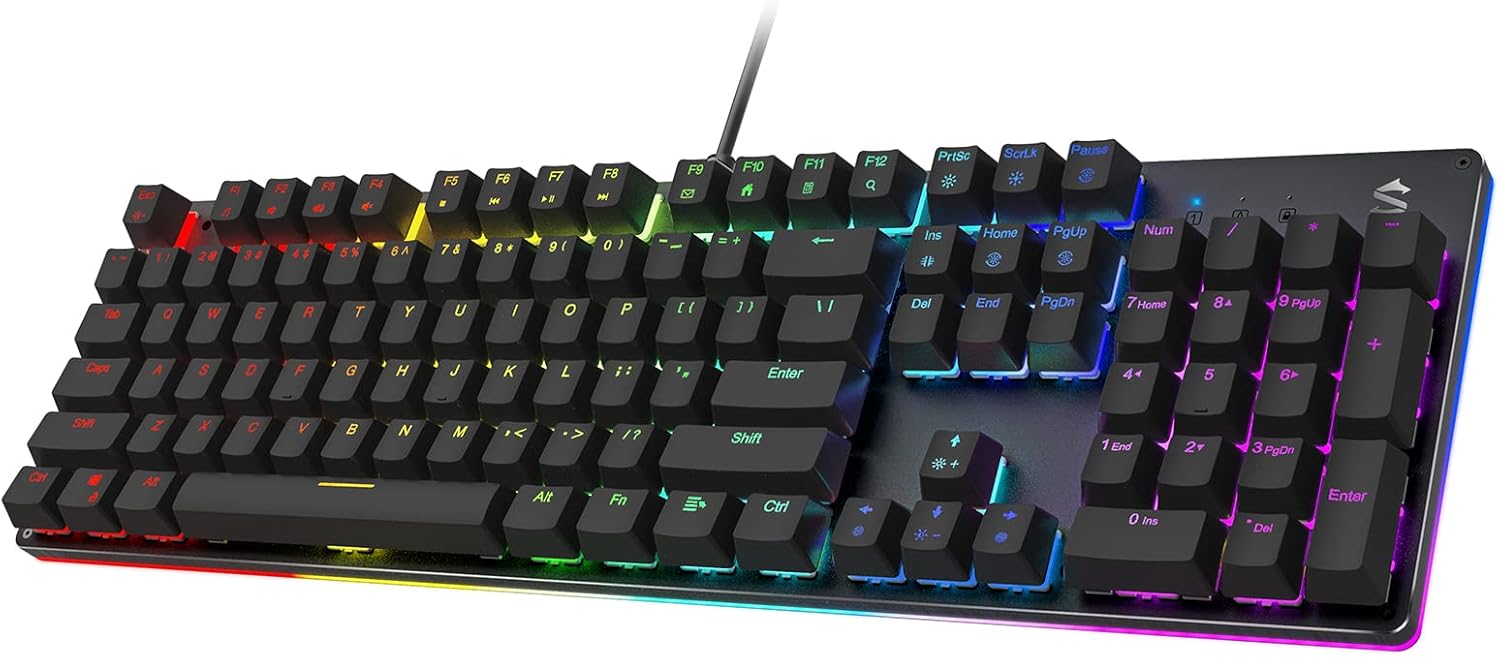
Black Shark RGB Mechanical Gaming Keyboard LED Backlit Wired Keyboard with Blue Switches, Fully Programmable, Anti-Ghosting 104 Keys for Desktop PC, Sixgill K2
 Imported From: United States
At BOLO, we work hard to ensure the products you receive are new, genuine, and sourced from reputable suppliers.
Every product in the BOLO catalogue is sourced through our Verified Global Supply Network of verified sellers, authorized distributors or directly from the manufacturer.
Each product undergoes thorough inspection and verification at our consolidation and fulfilment centers to ensure it meets our strict authenticity and quality standards before being shipped and delivered to you.
If you ever have concerns regarding the authenticity of a product purchased from us, please contact Bolo Support. We will review your inquiry promptly and, if necessary, provide documentation verifying authenticity or offer a suitable resolution.
Your trust is our top priority, and we are committed to maintaining transparency and integrity in every transaction.
While we strive to display accurate information, variations in packaging, labeling, instructions, or formulation may occasionally occur due to regional differences or supplier updates. For detailed or manufacturer-specific information, please contact the brand directly or reach out to BOLO Support for assistance.
Unless otherwise stated, all prices displayed on the product page include applicable taxes and import duties.
BOLO operates in accordance with the laws and regulations of Bahrain. Any items found to be restricted or prohibited for sale within the Bahrain will be cancelled prior to shipment. We take proactive measures to ensure that only products permitted for sale in Bahrain are listed on our website.
All items are shipped by air, and any products classified as “Dangerous Goods (DG)” under IATA regulations will be removed from the order and cancelled.
All orders are processed manually, and we make every effort to process them promptly once confirmed. Products cancelled due to the above reasons will be permanently removed from listings across the website.


MULTIFUNCTIONAL GAMING KEYBOARD
104 Anti-Ghosting Keys
12 Multimedia Shorcuts (Fn+F1-F12)
Fn + Win,lock the Windows key to prevent interruptions when gaming

BLUE MECHANICAL SWITCHES
Quick, precise feedback with nice click sound and pleasant tactile feeling, ideal for typing and gaming (If need a quieter click sound, please choose the red switch)

PROFESSIONAL SOFTWARE
Macros setting, backlight design, keys customization and keys disabling. Download via (global.blackshark.com/pages/download)

360° RGB Side Lights
The RGB effects are not limited to the 12 RGB modes of the keys’ backlight, there are also 3 modes of RGB side-edge lighting. Choose from vibrant dynamic mode or solid static light (8 colors) that you delight in.

Ergonomic Layout
The high-low keys, 6-row layout design and two foldable stands on the bottom provide an ergonomic angle for better typing, minimize fatigue. Anti-slip rubber feet at the bottom also ensure stability while typing and gaming.

Durable ABS Keycaps
The keycaps on the Black Shark Sixgill K2 wired keyboard are precisely manufactured to provide uniform light transmission and offer high recognition for color and letter even in the dark; and the letters on them are scratch-resistant, fade-resistant and anti-blurring.

Q. Does the backlight of this keyboard have solid-color effects?
A. Yes. Please press "Fn+Home" to choose from the 8 color settings (red-green-blue-yellow-cyan-purple-white-colors cycling). but note that some lighting effects can not be changed to a solid color.
Q. Can the lights be turned off?
A. Yes. Press “Fn + Esc” for backlight on/off, and press "Fn + Ins" repeatedly for sidelight on/off.
Q. How to change the lighting mode on the keyboard?
A. Press "Fn+PrtSc" for backlight modes change, "Fn+Home" for backlight color change; Press "Fn+Ins" for sidelight mode change, "Fn+Pgup" for sidelight color change.
Onboard memory for 5 lighting groups:
A. Default - 5 game lighting modes (FPS, CF, COD, LOL, racing games)
B. Customize - Mechanical Keyboard Backlight onboard recording method:
1. Press “FN + Pause” repeatedly to choose a gaming lighting effect you want to edit
2. Press “FN + ScrLk” to enter customization mode, and the three LED indicators will flash rapidly
3. Press any key you want to light up, and press the key repeatedly to choose the color you like
4. Press “FN + ScrLk” to save your effect
C. Press and hold “FN + Del” for three seconds to reset the keyboard lighting back to default modes
(Download the user manual at product guides and documents on this detail page if needed.)
More from this brand
Similar items from “Gaming Keyboards”
Share with
Or share with link
https://www.bolo.bh/products/UO09D63DCZ4
Visit the Black Shark Store
Black Shark RGB Mechanical Gaming Keyboard LED Backlit Wired Keyboard with Blue Switches, Fully Programmable, Anti-Ghosting 104 Keys for Desktop PC, Sixgill K2
Imported From: United States
At BOLO, we work hard to ensure the products you receive are new, genuine, and sourced from reputable suppliers.
Every product in the BOLO catalogue is sourced through our Verified Global Supply Network of verified sellers, authorized distributors or directly from the manufacturer.
Each product undergoes thorough inspection and verification at our consolidation and fulfilment centers to ensure it meets our strict authenticity and quality standards before being shipped and delivered to you.
If you ever have concerns regarding the authenticity of a product purchased from us, please contact Bolo Support. We will review your inquiry promptly and, if necessary, provide documentation verifying authenticity or offer a suitable resolution.
Your trust is our top priority, and we are committed to maintaining transparency and integrity in every transaction.
While we strive to display accurate information, variations in packaging, labeling, instructions, or formulation may occasionally occur due to regional differences or supplier updates. For detailed or manufacturer-specific information, please contact the brand directly or reach out to BOLO Support for assistance.
Unless otherwise stated, all prices displayed on the product page include applicable taxes and import duties.
BOLO operates in accordance with the laws and regulations of Bahrain. Any items found to be restricted or prohibited for sale within the Bahrain will be cancelled prior to shipment. We take proactive measures to ensure that only products permitted for sale in Bahrain are listed on our website.
All items are shipped by air, and any products classified as “Dangerous Goods (DG)” under IATA regulations will be removed from the order and cancelled.
All orders are processed manually, and we make every effort to process them promptly once confirmed. Products cancelled due to the above reasons will be permanently removed from listings across the website.
Description:
What's in the box
Details:
| Brand | Black Shark |
|---|---|
| Model Name | BS-K2 |
| Compatible Devices | PC |
| Connectivity Technology | Wired |
| Color | Blue Switch |
MULTIFUNCTIONAL GAMING KEYBOARD
104 Anti-Ghosting Keys
12 Multimedia Shorcuts (Fn+F1-F12)
Fn + Win,lock the Windows key to prevent interruptions when gaming
BLUE MECHANICAL SWITCHES
Quick, precise feedback with nice click sound and pleasant tactile feeling, ideal for typing and gaming (If need a quieter click sound, please choose the red switch)
PROFESSIONAL SOFTWARE
Macros setting, backlight design, keys customization and keys disabling. Download via (global.blackshark.com/pages/download)
360° RGB Side Lights
The RGB effects are not limited to the 12 RGB modes of the keys’ backlight, there are also 3 modes of RGB side-edge lighting. Choose from vibrant dynamic mode or solid static light (8 colors) that you delight in.
Ergonomic Layout
The high-low keys, 6-row layout design and two foldable stands on the bottom provide an ergonomic angle for better typing, minimize fatigue. Anti-slip rubber feet at the bottom also ensure stability while typing and gaming.
Durable ABS Keycaps
The keycaps on the Black Shark Sixgill K2 wired keyboard are precisely manufactured to provide uniform light transmission and offer high recognition for color and letter even in the dark; and the letters on them are scratch-resistant, fade-resistant and anti-blurring.
Q. Does the backlight of this keyboard have solid-color effects?
A. Yes. Please press "Fn+Home" to choose from the 8 color settings (red-green-blue-yellow-cyan-purple-white-colors cycling). but note that some lighting effects can not be changed to a solid color.
Q. Can the lights be turned off?
A. Yes. Press “Fn + Esc” for backlight on/off, and press "Fn + Ins" repeatedly for sidelight on/off.
Q. How to change the lighting mode on the keyboard?
A. Press "Fn+PrtSc" for backlight modes change, "Fn+Home" for backlight color change; Press "Fn+Ins" for sidelight mode change, "Fn+Pgup" for sidelight color change.
Onboard memory for 5 lighting groups:
A. Default - 5 game lighting modes (FPS, CF, COD, LOL, racing games)
B. Customize - Mechanical Keyboard Backlight onboard recording method:
1. Press “FN + Pause” repeatedly to choose a gaming lighting effect you want to edit
2. Press “FN + ScrLk” to enter customization mode, and the three LED indicators will flash rapidly
3. Press any key you want to light up, and press the key repeatedly to choose the color you like
4. Press “FN + ScrLk” to save your effect
C. Press and hold “FN + Del” for three seconds to reset the keyboard lighting back to default modes
(Download the user manual at product guides and documents on this detail page if needed.)
More from this brand
Similar items from “Gaming Keyboards”
Share with
Or share with link
https://www.bolo.bh/products/UO09D63DCZ4