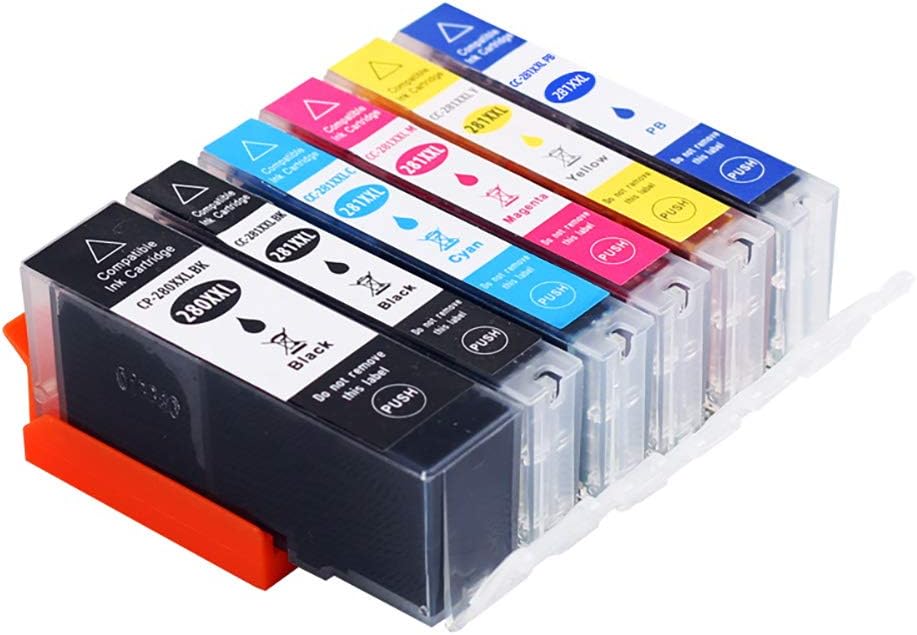
Description:
Compatible Printer Models:
Canon Pixma TS8120
Canon Pixma TS8220
Canon Pixma TS9120
Install ink cartridges
(1), when the red ink lights start flashing or continue to shine, please immediately replace the ink cartridges, can avoid some of the failures caused by the memory of the printer. New cartridge before installation must be torn net porosity (i.e. yellow sticker) seals, and to ensure that each pore is completely smooth, then install it to the printer, buckle clamp protection, according to the cleaning key until the ink filling process.
(2), after the installation of new ink cartridges, the first must be a nozzle detection, detection and printing pattern or a certain color can not be hit, still need to clean the print head until normal, otherwise the printing pattern will be serious color or color.
(3) when any ink cartridge is not in ink or not, the printer is unable to work, even if there is ink in other ink cartridges.
(4), the new ink cartridges, once the machine, in the replacement of the cutting part of the former.
(5), unless the ink cartridge is changed, it is usually not possible to use the ink cartridge to protect the ink cartridge.
Details:
Visit the buyink Store
Compatible Ink Cartridge Replacement for Canon PGI-280XXL CLI-281XXL PGI 280 XXL CLI 281 XXL to use with PIXMA TS8320 TS8220 TS8120 (PGBK, Black, Photo Blue, Cyan, Magenta, Yellow) 6 Pack
 Imported From: United States
At BOLO, we work hard to ensure the products you receive are new, genuine, and sourced from reputable suppliers.
Every product in the BOLO catalogue is sourced through our Verified Global Supply Network of verified sellers, authorized distributors or directly from the manufacturer.
Each product undergoes thorough inspection and verification at our consolidation and fulfilment centers to ensure it meets our strict authenticity and quality standards before being shipped and delivered to you.
If you ever have concerns regarding the authenticity of a product purchased from us, please contact Bolo Support. We will review your inquiry promptly and, if necessary, provide documentation verifying authenticity or offer a suitable resolution.
Your trust is our top priority, and we are committed to maintaining transparency and integrity in every transaction.
While we strive to display accurate information, variations in packaging, labeling, instructions, or formulation may occasionally occur due to regional differences or supplier updates. For detailed or manufacturer-specific information, please contact the brand directly or reach out to BOLO Support for assistance.
Unless otherwise stated, all prices displayed on the product page include applicable taxes and import duties.
BOLO operates in accordance with the laws and regulations of Bahrain. Any items found to be restricted or prohibited for sale within the Bahrain will be cancelled prior to shipment. We take proactive measures to ensure that only products permitted for sale in Bahrain are listed on our website.
All items are shipped by air, and any products classified as “Dangerous Goods (DG)” under IATA regulations will be removed from the order and cancelled.
All orders are processed manually, and we make every effort to process them promptly once confirmed. Products cancelled due to the above reasons will be permanently removed from listings across the website.
Share with
Or share with link
https://www.bolo.bh/products/UO07D75P7TC
Visit the buyink Store
Compatible Ink Cartridge Replacement for Canon PGI-280XXL CLI-281XXL PGI 280 XXL CLI 281 XXL to use with PIXMA TS8320 TS8220 TS8120 (PGBK, Black, Photo Blue, Cyan, Magenta, Yellow) 6 Pack
Imported From: United States
At BOLO, we work hard to ensure the products you receive are new, genuine, and sourced from reputable suppliers.
Every product in the BOLO catalogue is sourced through our Verified Global Supply Network of verified sellers, authorized distributors or directly from the manufacturer.
Each product undergoes thorough inspection and verification at our consolidation and fulfilment centers to ensure it meets our strict authenticity and quality standards before being shipped and delivered to you.
If you ever have concerns regarding the authenticity of a product purchased from us, please contact Bolo Support. We will review your inquiry promptly and, if necessary, provide documentation verifying authenticity or offer a suitable resolution.
Your trust is our top priority, and we are committed to maintaining transparency and integrity in every transaction.
While we strive to display accurate information, variations in packaging, labeling, instructions, or formulation may occasionally occur due to regional differences or supplier updates. For detailed or manufacturer-specific information, please contact the brand directly or reach out to BOLO Support for assistance.
Unless otherwise stated, all prices displayed on the product page include applicable taxes and import duties.
BOLO operates in accordance with the laws and regulations of Bahrain. Any items found to be restricted or prohibited for sale within the Bahrain will be cancelled prior to shipment. We take proactive measures to ensure that only products permitted for sale in Bahrain are listed on our website.
All items are shipped by air, and any products classified as “Dangerous Goods (DG)” under IATA regulations will be removed from the order and cancelled.
All orders are processed manually, and we make every effort to process them promptly once confirmed. Products cancelled due to the above reasons will be permanently removed from listings across the website.
Description:
Compatible Printer Models:
Canon Pixma TS8120
Canon Pixma TS8220
Canon Pixma TS9120
Install ink cartridges
(1), when the red ink lights start flashing or continue to shine, please immediately replace the ink cartridges, can avoid some of the failures caused by the memory of the printer. New cartridge before installation must be torn net porosity (i.e. yellow sticker) seals, and to ensure that each pore is completely smooth, then install it to the printer, buckle clamp protection, according to the cleaning key until the ink filling process.
(2), after the installation of new ink cartridges, the first must be a nozzle detection, detection and printing pattern or a certain color can not be hit, still need to clean the print head until normal, otherwise the printing pattern will be serious color or color.
(3) when any ink cartridge is not in ink or not, the printer is unable to work, even if there is ink in other ink cartridges.
(4), the new ink cartridges, once the machine, in the replacement of the cutting part of the former.
(5), unless the ink cartridge is changed, it is usually not possible to use the ink cartridge to protect the ink cartridge.
Details:
Share with
Or share with link
https://www.bolo.bh/products/UO07D75P7TC