Description:
What's in the box
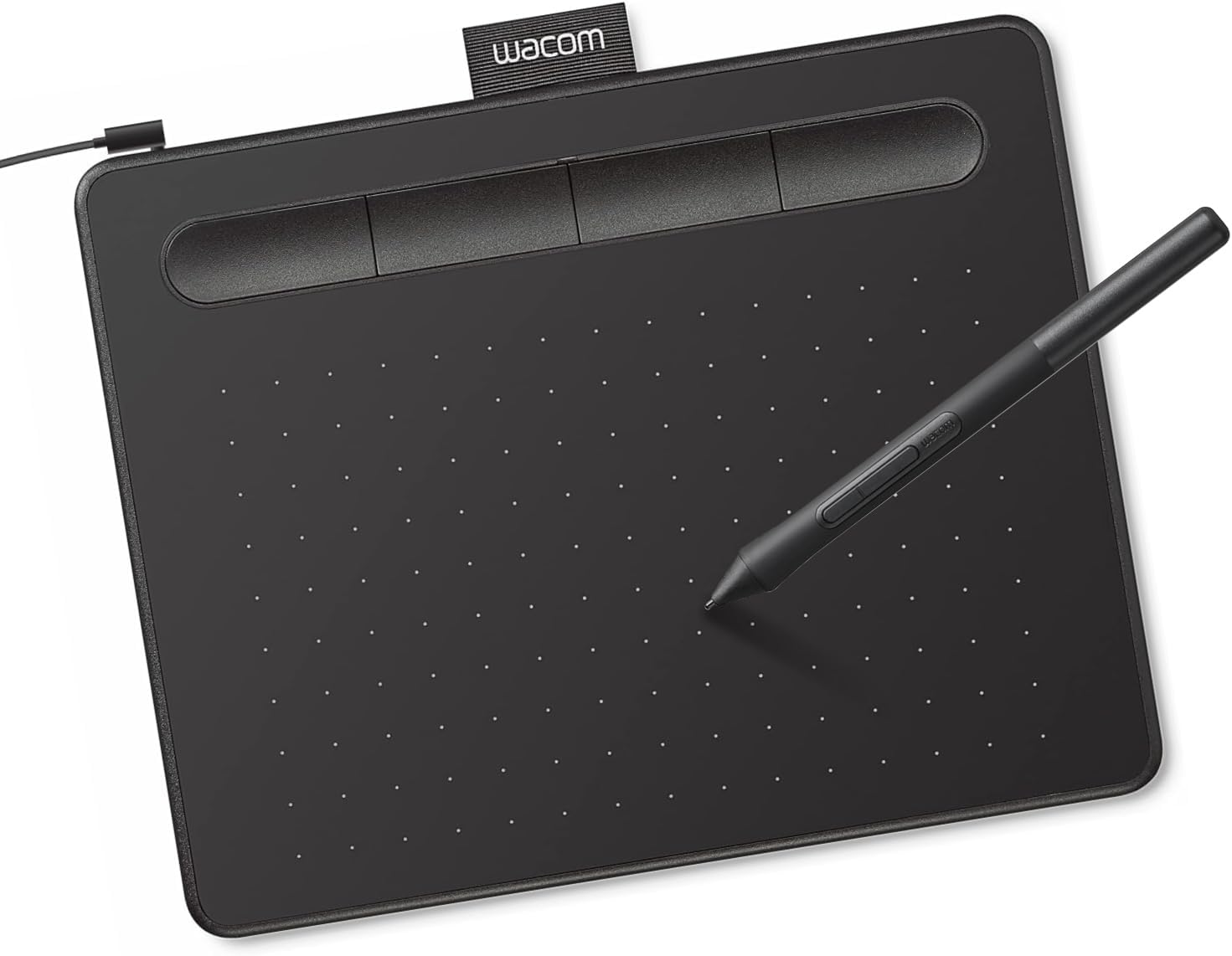
Wacom Intuos pen tablet has been designed for those who are getting started drawing, painting or photo editing with their Mac, PC, Chromebook or select Android smartphones/tablets. Whether it’s the light super-accurate pen, the stylish design, the included software or online tutorials, Wacom Intuos is all you need to get creative digitally. Wacom Intuos can also be used to easily write, edit or convey ideas to in education or remote work settings. This product works with devices capable of running the latest version of Chrome OS and has been certified to meet Google's compatibility standards. Google is not responsible for the operation of this product or its compliance with safety requirements. Chromebook, Android, and the Works With Chromebook badge are trademarks of Google LLC.
Details:
| Brand | Wacom |
|---|---|
| Connectivity Technology | USB-A |
| Pressure Sensitivity | 4096 levels |
| Operating System | Works with Windows, Mac OS, Android |
| Special Feature | Plug-and-play with Chromebook |
Visit the Wacom Store
Wacom Intuos Small, Wired Graphic Drawing Tablet with Pen + Software | Battery-free pen, 4 ExpressKeys for shortcuts, works with Mac, Windows & Chromebook; Ideal for creators, students & teachers
BHD2842
Quantity:
Order today to get by 7-14 business days
This item qualifies for free delivery
 Imported From: United States
At BOLO, we work hard to ensure the products you receive are new, genuine, and sourced from reputable suppliers.
Every product in the BOLO catalogue is sourced through our Verified Global Supply Network of verified sellers, authorized distributors or directly from the manufacturer.
Each product undergoes thorough inspection and verification at our consolidation and fulfilment centers to ensure it meets our strict authenticity and quality standards before being shipped and delivered to you.
If you ever have concerns regarding the authenticity of a product purchased from us, please contact Bolo Support. We will review your inquiry promptly and, if necessary, provide documentation verifying authenticity or offer a suitable resolution.
Your trust is our top priority, and we are committed to maintaining transparency and integrity in every transaction.
While we strive to display accurate information, variations in packaging, labeling, instructions, or formulation may occasionally occur due to regional differences or supplier updates. For detailed or manufacturer-specific information, please contact the brand directly or reach out to BOLO Support for assistance.
Unless otherwise stated, all prices displayed on the product page include applicable taxes and import duties.
BOLO operates in accordance with the laws and regulations of Bahrain. Any items found to be restricted or prohibited for sale within the Bahrain will be cancelled prior to shipment. We take proactive measures to ensure that only products permitted for sale in Bahrain are listed on our website.
All items are shipped by air, and any products classified as “Dangerous Goods (DG)” under IATA regulations will be removed from the order and cancelled.
All orders are processed manually, and we make every effort to process them promptly once confirmed. Products cancelled due to the above reasons will be permanently removed from listings across the website.

Everything you need to start creating: tablet, battery-free pen, creative software, and training. Bundled together at a beginner-friendly price from the pen technology company trusted by professionals for 40+ years.

Software & Training Included
You're not just buying a drawing tablet - you're getting a complete solution to start creating today. With 2 years of CLIP STUDIO PAINT PRO, 12 months of Boris FX Optics, trials of Corel Painter, Corel Aftershot, Magma, Luminar Neo, & Concepts. Plus access to Skillshare training courses. Register your tablet to access this software and training package.

No Dead Batteries. No Lag. No Jitter.
Battery-free pressure-sensitive pen means no dead batteries mid-project, no lag when you're in the zone, no jittery lines that ruin your work. Wacom's proven EMR technology delivers consistent performance - the first stroke feels the same as the thousandth. Unlike some tablets where pressure sensitivity degrades or stops working after a few months, Wacom Intuos maintains smooth, reliable response for years.

Built to Last Years, Not Months
Wacom Intuos delivers reliable performance year after year with stable drivers that work after every operating system update, durable construction that won't wear out, and a responsive customer care team when you need help. One quality tablet that grows with your skills - better for your wallet and your creative momentum.

These aren't just features - they're designed to make creating easier. The battery-free pen never needs charging and the pressure sensitivity responds naturally to your touch. ExpressKeys keep your keyboard shortcuts within reach so you stay focused on creating, not hunting through menus. Compatible with Chromebook, Windows, Mac, and all major creative apps - start creating immediately.
How People Use Wacom Intuos

Drawing and Painting
Create manga, characters, or digital paintings with pen precision. Your pen becomes whatever you need - pencil for sketches, brush for bold strokes, eraser for fixes. The pressure-sensitive pen responds instantly to your touch, making digital drawing feel as natural as paper.

Design with Precision
Whether you're designing a logo, creating something for school, or exploring visual ideas, precise pen control makes design easier. Create smooth curves, adjust colors accurately, and refine details with natural hand movements. ExpressKeys give you instant access to your favorite keyboard shortcuts so you can stay in your creative flow.

Photo Editing & Effects
Edit photos with the precision of a pen instead of wrestling with a mouse. Make exact selections for perfect cropping, smooth out imperfections, or add effects that make your images stand out. The pressure-sensitive pen gives you control that feels natural - like working with real art tools instead of clicking around.

Annotation, Markup & Teaching
The pen-on-tablet feel makes it easy to capture ideas and mark up documents in OneNote, Canvas, or PowerPoint. Many educators also appreciate the wireless tablet's ability to control their computer while moving around the classroom.

Why Buy Wacom
Choosing your first drawing tablet is a big decision. When you buy Wacom you get: Japanese engineering, software and training included, responsive customer care team, stable drivers that work after OS updates, and durable construction that lasts for years. For over 40 years, Wacom has been trusted by professionals and beginners who want reliable tools. The price difference isn't markup - it's measurable value. Start with confidence. Start with Wacom.
More from this brand
Similar items from “Graphics Tablets”
Share with
Or share with link
https://www.bolo.bh/products/UO079UY9LFS
Visit the Wacom Store
Wacom Intuos Small, Wired Graphic Drawing Tablet with Pen + Software | Battery-free pen, 4 ExpressKeys for shortcuts, works with Mac, Windows & Chromebook; Ideal for creators, students & teachers
BHD2842
Quantity:
Order today to get by 7-14 business days
This item qualifies for free delivery
Imported From: United States
At BOLO, we work hard to ensure the products you receive are new, genuine, and sourced from reputable suppliers.
Every product in the BOLO catalogue is sourced through our Verified Global Supply Network of verified sellers, authorized distributors or directly from the manufacturer.
Each product undergoes thorough inspection and verification at our consolidation and fulfilment centers to ensure it meets our strict authenticity and quality standards before being shipped and delivered to you.
If you ever have concerns regarding the authenticity of a product purchased from us, please contact Bolo Support. We will review your inquiry promptly and, if necessary, provide documentation verifying authenticity or offer a suitable resolution.
Your trust is our top priority, and we are committed to maintaining transparency and integrity in every transaction.
While we strive to display accurate information, variations in packaging, labeling, instructions, or formulation may occasionally occur due to regional differences or supplier updates. For detailed or manufacturer-specific information, please contact the brand directly or reach out to BOLO Support for assistance.
Unless otherwise stated, all prices displayed on the product page include applicable taxes and import duties.
BOLO operates in accordance with the laws and regulations of Bahrain. Any items found to be restricted or prohibited for sale within the Bahrain will be cancelled prior to shipment. We take proactive measures to ensure that only products permitted for sale in Bahrain are listed on our website.
All items are shipped by air, and any products classified as “Dangerous Goods (DG)” under IATA regulations will be removed from the order and cancelled.
All orders are processed manually, and we make every effort to process them promptly once confirmed. Products cancelled due to the above reasons will be permanently removed from listings across the website.
Description:
What's in the box
Wacom Intuos pen tablet has been designed for those who are getting started drawing, painting or photo editing with their Mac, PC, Chromebook or select Android smartphones/tablets. Whether it’s the light super-accurate pen, the stylish design, the included software or online tutorials, Wacom Intuos is all you need to get creative digitally. Wacom Intuos can also be used to easily write, edit or convey ideas to in education or remote work settings. This product works with devices capable of running the latest version of Chrome OS and has been certified to meet Google's compatibility standards. Google is not responsible for the operation of this product or its compliance with safety requirements. Chromebook, Android, and the Works With Chromebook badge are trademarks of Google LLC.
Details:
| Brand | Wacom |
|---|---|
| Connectivity Technology | USB-A |
| Pressure Sensitivity | 4096 levels |
| Operating System | Works with Windows, Mac OS, Android |
| Special Feature | Plug-and-play with Chromebook |
Everything you need to start creating: tablet, battery-free pen, creative software, and training. Bundled together at a beginner-friendly price from the pen technology company trusted by professionals for 40+ years.
Software & Training Included
You're not just buying a drawing tablet - you're getting a complete solution to start creating today. With 2 years of CLIP STUDIO PAINT PRO, 12 months of Boris FX Optics, trials of Corel Painter, Corel Aftershot, Magma, Luminar Neo, & Concepts. Plus access to Skillshare training courses. Register your tablet to access this software and training package.
No Dead Batteries. No Lag. No Jitter.
Battery-free pressure-sensitive pen means no dead batteries mid-project, no lag when you're in the zone, no jittery lines that ruin your work. Wacom's proven EMR technology delivers consistent performance - the first stroke feels the same as the thousandth. Unlike some tablets where pressure sensitivity degrades or stops working after a few months, Wacom Intuos maintains smooth, reliable response for years.
Built to Last Years, Not Months
Wacom Intuos delivers reliable performance year after year with stable drivers that work after every operating system update, durable construction that won't wear out, and a responsive customer care team when you need help. One quality tablet that grows with your skills - better for your wallet and your creative momentum.
These aren't just features - they're designed to make creating easier. The battery-free pen never needs charging and the pressure sensitivity responds naturally to your touch. ExpressKeys keep your keyboard shortcuts within reach so you stay focused on creating, not hunting through menus. Compatible with Chromebook, Windows, Mac, and all major creative apps - start creating immediately.
How People Use Wacom Intuos
Drawing and Painting
Create manga, characters, or digital paintings with pen precision. Your pen becomes whatever you need - pencil for sketches, brush for bold strokes, eraser for fixes. The pressure-sensitive pen responds instantly to your touch, making digital drawing feel as natural as paper.
Design with Precision
Whether you're designing a logo, creating something for school, or exploring visual ideas, precise pen control makes design easier. Create smooth curves, adjust colors accurately, and refine details with natural hand movements. ExpressKeys give you instant access to your favorite keyboard shortcuts so you can stay in your creative flow.
Photo Editing & Effects
Edit photos with the precision of a pen instead of wrestling with a mouse. Make exact selections for perfect cropping, smooth out imperfections, or add effects that make your images stand out. The pressure-sensitive pen gives you control that feels natural - like working with real art tools instead of clicking around.
Annotation, Markup & Teaching
The pen-on-tablet feel makes it easy to capture ideas and mark up documents in OneNote, Canvas, or PowerPoint. Many educators also appreciate the wireless tablet's ability to control their computer while moving around the classroom.
Why Buy Wacom
Choosing your first drawing tablet is a big decision. When you buy Wacom you get: Japanese engineering, software and training included, responsive customer care team, stable drivers that work after OS updates, and durable construction that lasts for years. For over 40 years, Wacom has been trusted by professionals and beginners who want reliable tools. The price difference isn't markup - it's measurable value. Start with confidence. Start with Wacom.
More from this brand
Similar items from “Graphics Tablets”
Share with
Or share with link
https://www.bolo.bh/products/UO079UY9LFS