
Description:
What's in the box
Details:
| Brand | ClonerAlliance |
|---|---|
| Hardware Interface | 3.5mm Audio, Component Video, Composite Video, HDMI, Micro USB 2.0 Type B, USB 2.0 Type A, VGA |
| Video Capture Resolution | 1080p |
| Operating System | Windows |
| Recommended Uses For Product | Video Recording |
Visit the ClonerAlliance Store
ClonerAlliance Box Pro, 1080p@60fps Video Recorder, DVR with HDMI Capture, Playback on TV. RCA/YPbPr/VGA to Digital Converter. Schedule Recording. No PC Required.
BHD12070
Quantity:
Order today to get by 7-14 business days
This item qualifies for free delivery
 Imported From: United States
At BOLO, we work hard to ensure the products you receive are new, genuine, and sourced from reputable suppliers.
Every product in the BOLO catalogue is sourced through our Verified Global Supply Network of verified sellers, authorized distributors or directly from the manufacturer.
Each product undergoes thorough inspection and verification at our consolidation and fulfilment centers to ensure it meets our strict authenticity and quality standards before being shipped and delivered to you.
If you ever have concerns regarding the authenticity of a product purchased from us, please contact Bolo Support. We will review your inquiry promptly and, if necessary, provide documentation verifying authenticity or offer a suitable resolution.
Your trust is our top priority, and we are committed to maintaining transparency and integrity in every transaction.
While we strive to display accurate information, variations in packaging, labeling, instructions, or formulation may occasionally occur due to regional differences or supplier updates. For detailed or manufacturer-specific information, please contact the brand directly or reach out to BOLO Support for assistance.
Unless otherwise stated, all prices displayed on the product page include applicable taxes and import duties.
BOLO operates in accordance with the laws and regulations of Bahrain. Any items found to be restricted or prohibited for sale within the Bahrain will be cancelled prior to shipment. We take proactive measures to ensure that only products permitted for sale in Bahrain are listed on our website.
All items are shipped by air, and any products classified as “Dangerous Goods (DG)” under IATA regulations will be removed from the order and cancelled.
All orders are processed manually, and we make every effort to process them promptly once confirmed. Products cancelled due to the above reasons will be permanently removed from listings across the website.

A versatile user-friendly video recording box. Easy to get started no matter what source device you're using. (CAN NOT Record Smart TV or Antenna TV)
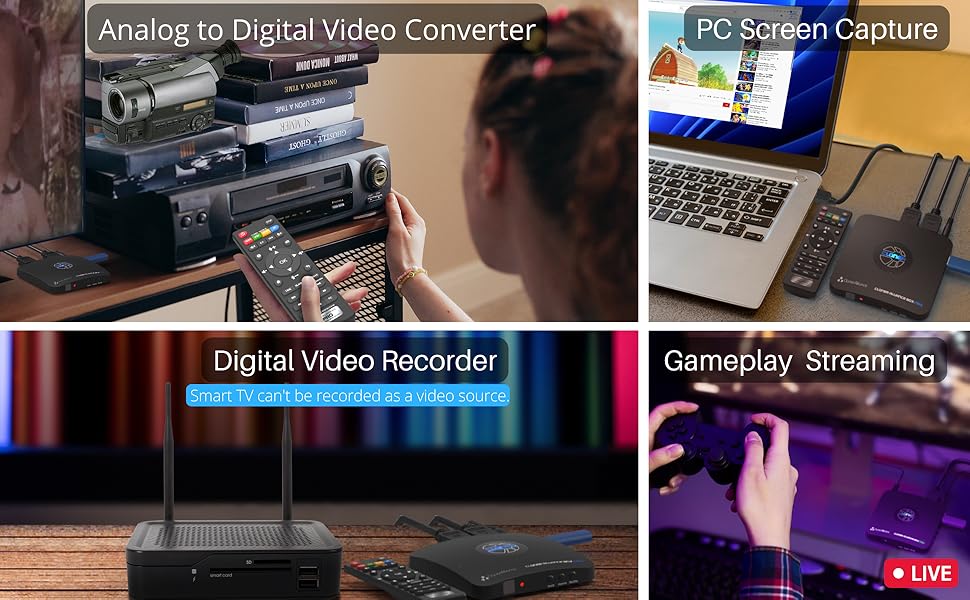
Standalone Analog to Digital Video Converter
- Converts analog videos to digital video files(MP4/H.264). No PC is required.
- Supports Composite/RCA and Component/YPbPr, and VGA input signals.
Standalone Digital Video Recorder (Smart TVs/Antennas are NOT compatible)
- Supports HDMI input signal.
- Captures Full HD videos or gameplay from game consoles, DVR, VCR, etc onto a USB flash drive or external hard disk. PC Free.
- IMPORTANT: 4K input(3840*2160@30fps) is supported, but all output signals and recorded videos will be in 1080p@60fps. This resolution conversion is normal and expected.
Instant Playback
- Instantly Playback recorded videos on USB storage devices with the remote.
- No need to get up from your couch to check the status of the recording anymore. (The recorded MP4 files can be played back using your computer's software player as well.)
Easy to use for everyone
- Suitable for both beginners and professional video creators.
- No matter what age you are, you can master it quickly.
Your next Must-Have next to your TV

Connect and it's done! Just sit on the couch and do the rest with the remote.
Some of your most cherished moments like birthday parties or weddings in life may be on VCR or other analog signal devices.
Take your time to backup them now! ClonerAlliance Box Pro enables you to record videos from any device with a Composite/RCA, Component/YPbPr, or VGA output and keep them forever.
And then just press the "PLAYBACK" button on the remote, and you can enjoy the recorded videos instantly.
What's more? OSD menu provides a variety of functions: Record Resolution, Bitrate, Brightness, Contrast, Schedule Recording, etc.
Digitize Your Precious Memories to Modern Devices

Do you have VHS tapes or video discs that need to be converted to MP4 digital files? Or you have too many video files saved on your DVR and need to free its storage space. With ClonerAlliance Box Pro, just one press, all your favorite videos can be stored on your USB storage devices.
The recorded MP4 files are compatible with PCs, Tablets, Mobile phones, and any other modern devices, including your smart TV.
Smooth 1080p@60fps recording in various scenarios
Easy to Use. Everyone Can Be a Pro
Take in digital or various analog signals and switch the video source freely with the remote, no need to repeatedly plug and unplug devices.
Widely compatible with high-capacity USB flash drives(Up to 512GB) or external hard drives (Up to 8TB).
You can also use it to capture your PC's screen for recording video conferences, online courses, and any other content. Like a Pro.
With 3rd party software such as OBS, XSplit, etc, allows you to capture and live HD gaming videos from any game console. The internal 3.5mm mic jack allows you to add your own live commentary.
Audio and USB storage device Tip:
The product records PCM or Stereo format. Please adjust the audio output of the source device to PCM or Stereo.
It's recommended that the reading and writing speeds of the USB storage device are both 50Mbps or above.
Learn More about ClonerAlliance Box Pro

Do more with your PC
Everyone can easily get started with PC MODE.
Use OBS Studio and ClonerAlliance Helper to live stream or record videos.
Connect ClonerAlliance Box Pro with your PC, and then you can record and live games/videos on YouTube/Twitch/Facebook, and other live platforms.
- Windows system is required.
- Please install ClonerAlliance Helper first before using OBS studio.
- Mac/Linux are not supported with PC MODE.

Schedule recording
Schedule recording at your convenience.
You must want to enjoy the latest sporting events and stay up to date with your favorite videos.
Set up your video source, select the target channel, schedule recording task. ClonerAlliance Box Pro will do the rest for you.
Tip: Ensure you select the desired channel on your device before recording. You can't watch a different channel while recording another.

One press to snapshot
Press one button to take a screenshot as a JPG file.
Amazing or hilarious moments while watching videos won’t wait your camera to capture.
Just one press can make it. Stores them into a folder so as to browse them anytime.

Widely compatibility
ClonerAlliance Box Pro is compatible with video sources with standard HDMI (Type-A), RCA/composite, component/YPbPr, VGA output ports.
Use the included HDMI cable or MMI connector to make a connection and start recording.
- Please check the Compatible Video Sources in the technical specification table below.
- The Smart TV & TV Antenna can't be a video Source.
For the Mini-HDMI(TYPE-C) or Micro-HDMI(TYPE-D) port, a To TYPE-A adapter is required (Not included).
For the Female (RCA/VGA)ports, a Male-to-Male cable is required (Not included).
More Reasons to Have ClonerAlliance Box Pro

Supports exFAT, NTFS, FAT/FAT32, MBR,GPT
Not only is it compatible with GPT and MBR partition structures, it can also write MP4 files to exFAT, NTFS, FAT/FAT file systems. Whether you are using a retro computer system or a modern PC system (Windows, Mac OS, Android, Linux), the recorded MP4 video files can be safely saved forever.

Simple setup with 3 steps
- Connect your video source’s output port to the input port of the ClonerAlliance Box Pro.
- Connect the ClonerAlliance Box Pro’s output port to your TV
- Plug a USB drive into the "Storage" port of the ClonerAlliance Box Pro.
IMPORTANT: CANNOT Record from Smart TV Built-in Apps or Antenna TV.
All set and enjoy!

Trusted by folks
Since launched in 2016, ClonerAlliance Box Pro has been trusted by customers. Over the years, it has also been continuously improved to meet the more recording and capture needs.

Long-term Service
We provide 90-Day No Hassle Return (at our cost) and 2-Year Replacement Service.
A longer service period gives you more peace of mind while using our products.
Similar suggestions by Bolo
More from this brand
Similar items from “Internal TV Tuner & Capture Cards”
Share with
Or share with link
https://www.bolo.bh/products/UO012G1Q0VT
Visit the ClonerAlliance Store
ClonerAlliance Box Pro, 1080p@60fps Video Recorder, DVR with HDMI Capture, Playback on TV. RCA/YPbPr/VGA to Digital Converter. Schedule Recording. No PC Required.
BHD12070
Quantity:
Order today to get by 7-14 business days
This item qualifies for free delivery
Imported From: United States
At BOLO, we work hard to ensure the products you receive are new, genuine, and sourced from reputable suppliers.
Every product in the BOLO catalogue is sourced through our Verified Global Supply Network of verified sellers, authorized distributors or directly from the manufacturer.
Each product undergoes thorough inspection and verification at our consolidation and fulfilment centers to ensure it meets our strict authenticity and quality standards before being shipped and delivered to you.
If you ever have concerns regarding the authenticity of a product purchased from us, please contact Bolo Support. We will review your inquiry promptly and, if necessary, provide documentation verifying authenticity or offer a suitable resolution.
Your trust is our top priority, and we are committed to maintaining transparency and integrity in every transaction.
While we strive to display accurate information, variations in packaging, labeling, instructions, or formulation may occasionally occur due to regional differences or supplier updates. For detailed or manufacturer-specific information, please contact the brand directly or reach out to BOLO Support for assistance.
Unless otherwise stated, all prices displayed on the product page include applicable taxes and import duties.
BOLO operates in accordance with the laws and regulations of Bahrain. Any items found to be restricted or prohibited for sale within the Bahrain will be cancelled prior to shipment. We take proactive measures to ensure that only products permitted for sale in Bahrain are listed on our website.
All items are shipped by air, and any products classified as “Dangerous Goods (DG)” under IATA regulations will be removed from the order and cancelled.
All orders are processed manually, and we make every effort to process them promptly once confirmed. Products cancelled due to the above reasons will be permanently removed from listings across the website.
Description:
What's in the box
Details:
| Brand | ClonerAlliance |
|---|---|
| Hardware Interface | 3.5mm Audio, Component Video, Composite Video, HDMI, Micro USB 2.0 Type B, USB 2.0 Type A, VGA |
| Video Capture Resolution | 1080p |
| Operating System | Windows |
| Recommended Uses For Product | Video Recording |
A versatile user-friendly video recording box. Easy to get started no matter what source device you're using. (CAN NOT Record Smart TV or Antenna TV)
Standalone Analog to Digital Video Converter
- Converts analog videos to digital video files(MP4/H.264). No PC is required.
- Supports Composite/RCA and Component/YPbPr, and VGA input signals.
Standalone Digital Video Recorder (Smart TVs/Antennas are NOT compatible)
- Supports HDMI input signal.
- Captures Full HD videos or gameplay from game consoles, DVR, VCR, etc onto a USB flash drive or external hard disk. PC Free.
- IMPORTANT: 4K input(3840*2160@30fps) is supported, but all output signals and recorded videos will be in 1080p@60fps. This resolution conversion is normal and expected.
Instant Playback
- Instantly Playback recorded videos on USB storage devices with the remote.
- No need to get up from your couch to check the status of the recording anymore. (The recorded MP4 files can be played back using your computer's software player as well.)
Easy to use for everyone
- Suitable for both beginners and professional video creators.
- No matter what age you are, you can master it quickly.
Your next Must-Have next to your TV
Connect and it's done! Just sit on the couch and do the rest with the remote.
Some of your most cherished moments like birthday parties or weddings in life may be on VCR or other analog signal devices.
Take your time to backup them now! ClonerAlliance Box Pro enables you to record videos from any device with a Composite/RCA, Component/YPbPr, or VGA output and keep them forever.
And then just press the "PLAYBACK" button on the remote, and you can enjoy the recorded videos instantly.
What's more? OSD menu provides a variety of functions: Record Resolution, Bitrate, Brightness, Contrast, Schedule Recording, etc.
Digitize Your Precious Memories to Modern Devices
Do you have VHS tapes or video discs that need to be converted to MP4 digital files? Or you have too many video files saved on your DVR and need to free its storage space. With ClonerAlliance Box Pro, just one press, all your favorite videos can be stored on your USB storage devices.
The recorded MP4 files are compatible with PCs, Tablets, Mobile phones, and any other modern devices, including your smart TV.
Smooth 1080p@60fps recording in various scenarios
Easy to Use. Everyone Can Be a Pro
Take in digital or various analog signals and switch the video source freely with the remote, no need to repeatedly plug and unplug devices.
Widely compatible with high-capacity USB flash drives(Up to 512GB) or external hard drives (Up to 8TB).
You can also use it to capture your PC's screen for recording video conferences, online courses, and any other content. Like a Pro.
With 3rd party software such as OBS, XSplit, etc, allows you to capture and live HD gaming videos from any game console. The internal 3.5mm mic jack allows you to add your own live commentary.
Audio and USB storage device Tip:
The product records PCM or Stereo format. Please adjust the audio output of the source device to PCM or Stereo.
It's recommended that the reading and writing speeds of the USB storage device are both 50Mbps or above.
Learn More about ClonerAlliance Box Pro
Do more with your PC
Everyone can easily get started with PC MODE.
Use OBS Studio and ClonerAlliance Helper to live stream or record videos.
Connect ClonerAlliance Box Pro with your PC, and then you can record and live games/videos on YouTube/Twitch/Facebook, and other live platforms.
- Windows system is required.
- Please install ClonerAlliance Helper first before using OBS studio.
- Mac/Linux are not supported with PC MODE.
Schedule recording
Schedule recording at your convenience.
You must want to enjoy the latest sporting events and stay up to date with your favorite videos.
Set up your video source, select the target channel, schedule recording task. ClonerAlliance Box Pro will do the rest for you.
Tip: Ensure you select the desired channel on your device before recording. You can't watch a different channel while recording another.
One press to snapshot
Press one button to take a screenshot as a JPG file.
Amazing or hilarious moments while watching videos won’t wait your camera to capture.
Just one press can make it. Stores them into a folder so as to browse them anytime.
Widely compatibility
ClonerAlliance Box Pro is compatible with video sources with standard HDMI (Type-A), RCA/composite, component/YPbPr, VGA output ports.
Use the included HDMI cable or MMI connector to make a connection and start recording.
- Please check the Compatible Video Sources in the technical specification table below.
- The Smart TV & TV Antenna can't be a video Source.
For the Mini-HDMI(TYPE-C) or Micro-HDMI(TYPE-D) port, a To TYPE-A adapter is required (Not included).
For the Female (RCA/VGA)ports, a Male-to-Male cable is required (Not included).
More Reasons to Have ClonerAlliance Box Pro
Supports exFAT, NTFS, FAT/FAT32, MBR,GPT
Not only is it compatible with GPT and MBR partition structures, it can also write MP4 files to exFAT, NTFS, FAT/FAT file systems. Whether you are using a retro computer system or a modern PC system (Windows, Mac OS, Android, Linux), the recorded MP4 video files can be safely saved forever.
Simple setup with 3 steps
- Connect your video source’s output port to the input port of the ClonerAlliance Box Pro.
- Connect the ClonerAlliance Box Pro’s output port to your TV
- Plug a USB drive into the "Storage" port of the ClonerAlliance Box Pro.
IMPORTANT: CANNOT Record from Smart TV Built-in Apps or Antenna TV.
All set and enjoy!
Trusted by folks
Since launched in 2016, ClonerAlliance Box Pro has been trusted by customers. Over the years, it has also been continuously improved to meet the more recording and capture needs.
Long-term Service
We provide 90-Day No Hassle Return (at our cost) and 2-Year Replacement Service.
A longer service period gives you more peace of mind while using our products.
Similar suggestions by Bolo
More from this brand
Similar items from “Internal TV Tuner & Capture Cards”
Share with
Or share with link
https://www.bolo.bh/products/UO012G1Q0VT