Description:
What's in the box?
Details:
| Brand | KEFEYA |
|---|---|
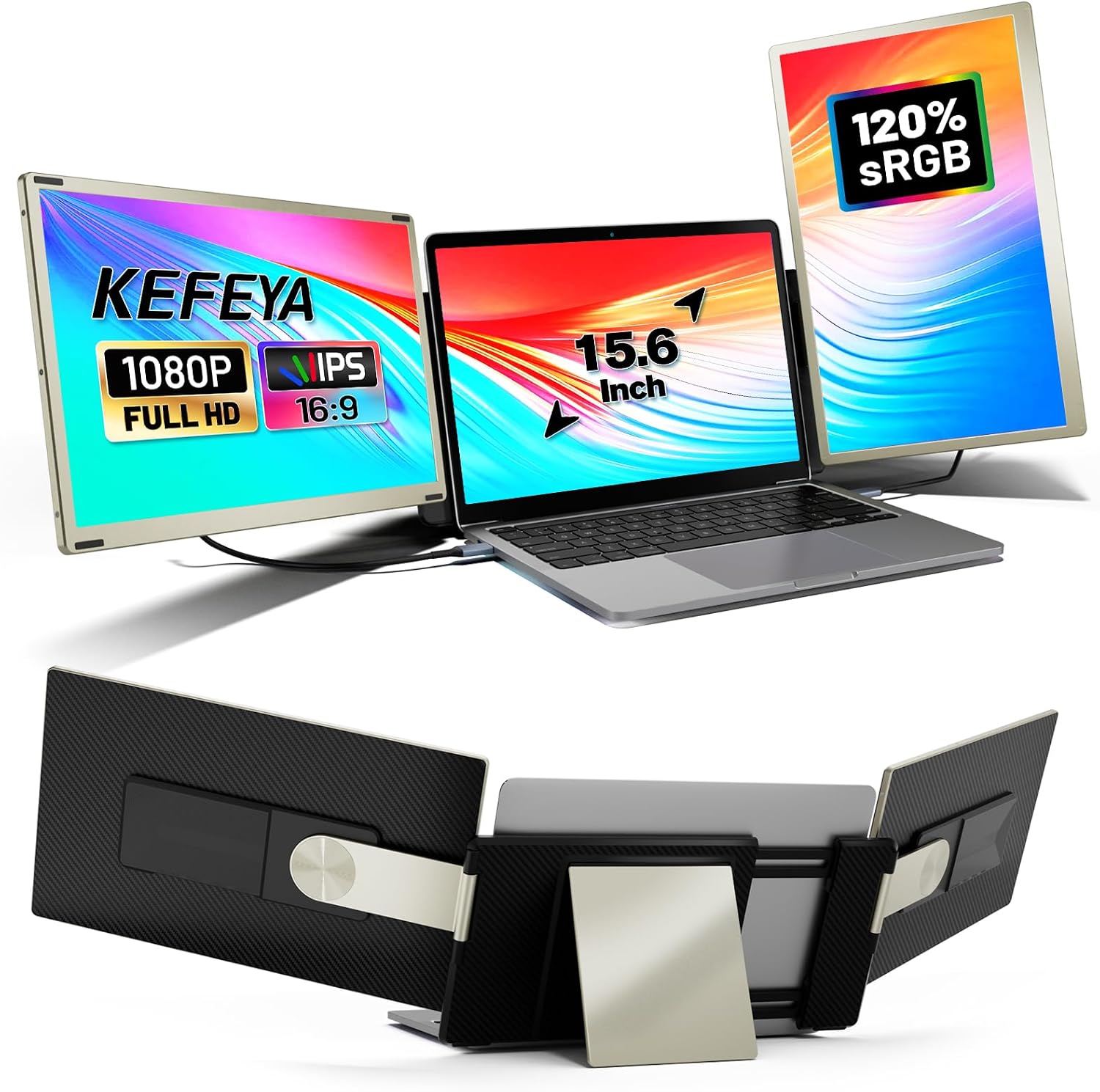
| Screen size | 15.6 Inches |
| Resolution | FHD 1080p |
| Aspect ratio | 16:9 |
| Screen surface description | Matte |
| Image contrast ratio | 1000:1 |
| Response time | 2 Milliseconds |
| Refresh rate | 60 Hz |
| Display resolution maximum | 1920 x 1080 Pixels |
| Special feature | Portable, Wide Compatibility, Large Screen, Flexible Design, Stand, Multi-Screen Support |
Visit the KEFEYA Store
KEFEYA 15.6" Laptop Screen Extender sRGB FHD 1080P IPS Screen Plug & Play Triple Portable Laptop Monitor Extender Mac, Windows, Chrome, Android for 13-17"
BHD22343
Quantity:
Order today to get by 7-14 business days
This item qualifies for free delivery
 Imported From: United Kingdom
At BOLO, we work hard to ensure the products you receive are new, genuine, and sourced from reputable suppliers.
Every product in the BOLO catalogue is sourced through our Verified Global Supply Network of verified sellers, authorized distributors or directly from the manufacturer.
Each product undergoes thorough inspection and verification at our consolidation and fulfilment centers to ensure it meets our strict authenticity and quality standards before being shipped and delivered to you.
If you ever have concerns regarding the authenticity of a product purchased from us, please contact Bolo Support. We will review your inquiry promptly and, if necessary, provide documentation verifying authenticity or offer a suitable resolution.
Your trust is our top priority, and we are committed to maintaining transparency and integrity in every transaction.
While we strive to display accurate information, variations in packaging, labeling, instructions, or formulation may occasionally occur due to regional differences or supplier updates. For detailed or manufacturer-specific information, please contact the brand directly or reach out to BOLO Support for assistance.
Unless otherwise stated, all prices displayed on the product page include applicable taxes and import duties.
BOLO operates in accordance with the laws and regulations of Bahrain. Any items found to be restricted or prohibited for sale within the Bahrain will be cancelled prior to shipment. We take proactive measures to ensure that only products permitted for sale in Bahrain are listed on our website.
All items are shipped by air, and any products classified as “Dangerous Goods (DG)” under IATA regulations will be removed from the order and cancelled.
All orders are processed manually, and we make every effort to process them promptly once confirmed. Products cancelled due to the above reasons will be permanently removed from listings across the website.


How to Connect the Screen
A: If your laptop has 2 full-featured USB-C ports (Thunderbolt ports): directly connect your computer's Thunderbolt port to your screen's TYPE-C port using a USB-C TO USB-C cable. (The connection is the same for both screens).
B: If your laptop has one HDMI port and multiple USB ports: for one screen, please use a USB TO USB-C cable and an HDMI TO USB-C cable; two cables to connect; for the other screen, use a USB TO USB-C cable and an H5-T TO USB-C cable; two cables to connect. (Note: The H5-T and HDMI cables need to be connected to the screen's USB WITH DP port).
C:If your laptop has more than one HDMI port and you need more HDMI cables to connect to the screen, please con-tact u-s.
Note: If during the process of connecting the screen, there are problems such as: only one monitor is working, displaying No Signal, Power Saving Mode, black screen, and so on. Please conta-ct u-s, we will help you to solve the problem.


Similar suggestions by Bolo
More from this brand
Share with
Or share with link
https://www.bolo.bh/products/KO0Q3FGEELZ
Visit the KEFEYA Store
KEFEYA 15.6" Laptop Screen Extender sRGB FHD 1080P IPS Screen Plug & Play Triple Portable Laptop Monitor Extender Mac, Windows, Chrome, Android for 13-17"
BHD22343
Quantity:
Order today to get by 7-14 business days
This item qualifies for free delivery
Imported From: United Kingdom
At BOLO, we work hard to ensure the products you receive are new, genuine, and sourced from reputable suppliers.
Every product in the BOLO catalogue is sourced through our Verified Global Supply Network of verified sellers, authorized distributors or directly from the manufacturer.
Each product undergoes thorough inspection and verification at our consolidation and fulfilment centers to ensure it meets our strict authenticity and quality standards before being shipped and delivered to you.
If you ever have concerns regarding the authenticity of a product purchased from us, please contact Bolo Support. We will review your inquiry promptly and, if necessary, provide documentation verifying authenticity or offer a suitable resolution.
Your trust is our top priority, and we are committed to maintaining transparency and integrity in every transaction.
While we strive to display accurate information, variations in packaging, labeling, instructions, or formulation may occasionally occur due to regional differences or supplier updates. For detailed or manufacturer-specific information, please contact the brand directly or reach out to BOLO Support for assistance.
Unless otherwise stated, all prices displayed on the product page include applicable taxes and import duties.
BOLO operates in accordance with the laws and regulations of Bahrain. Any items found to be restricted or prohibited for sale within the Bahrain will be cancelled prior to shipment. We take proactive measures to ensure that only products permitted for sale in Bahrain are listed on our website.
All items are shipped by air, and any products classified as “Dangerous Goods (DG)” under IATA regulations will be removed from the order and cancelled.
All orders are processed manually, and we make every effort to process them promptly once confirmed. Products cancelled due to the above reasons will be permanently removed from listings across the website.
Description:
What's in the box?
Details:
| Brand | KEFEYA |
|---|---|
| Screen size | 15.6 Inches |
| Resolution | FHD 1080p |
| Aspect ratio | 16:9 |
| Screen surface description | Matte |
| Image contrast ratio | 1000:1 |
| Response time | 2 Milliseconds |
| Refresh rate | 60 Hz |
| Display resolution maximum | 1920 x 1080 Pixels |
| Special feature | Portable, Wide Compatibility, Large Screen, Flexible Design, Stand, Multi-Screen Support |
How to Connect the Screen
A: If your laptop has 2 full-featured USB-C ports (Thunderbolt ports): directly connect your computer's Thunderbolt port to your screen's TYPE-C port using a USB-C TO USB-C cable. (The connection is the same for both screens).
B: If your laptop has one HDMI port and multiple USB ports: for one screen, please use a USB TO USB-C cable and an HDMI TO USB-C cable; two cables to connect; for the other screen, use a USB TO USB-C cable and an H5-T TO USB-C cable; two cables to connect. (Note: The H5-T and HDMI cables need to be connected to the screen's USB WITH DP port).
C:If your laptop has more than one HDMI port and you need more HDMI cables to connect to the screen, please con-tact u-s.
Note: If during the process of connecting the screen, there are problems such as: only one monitor is working, displaying No Signal, Power Saving Mode, black screen, and so on. Please conta-ct u-s, we will help you to solve the problem.
Similar suggestions by Bolo
More from this brand
Share with
Or share with link
https://www.bolo.bh/products/KO0Q3FGEELZ